Crawlers
Which AI agents fetch your site and why, whether your robots.txt lets them in, and whether the pages they crawl go on to earn citations.
Before an AI assistant can cite your site, its bot has to be able to read it. Block those bots by accident and you are invisible, no matter how good your content is.
What it does
Crawlers (Agent analytics) connects your server logs to your results. It shows which AI agents fetch your pages (GPTBot, ClaudeBot, PerplexityBot, and others), why they came (training, search indexing, or answering a live question), whether your robots.txt lets them in, and whether the pages they crawl earn you citations. It is how you confirm the front door is open.
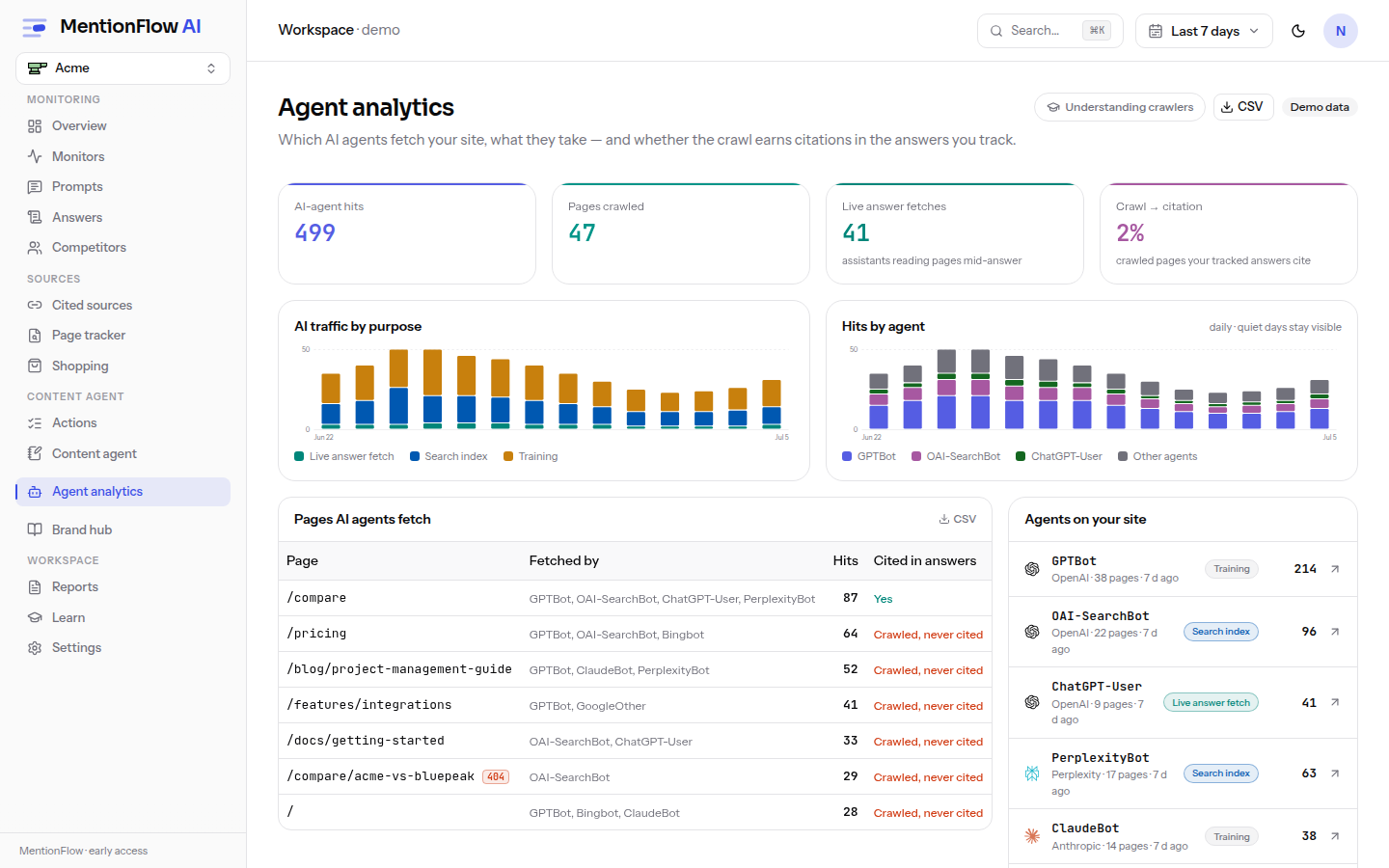
How to use it
The dashboard has three states: a plan-gated labelled sample preview, a connected-but-empty connect panel, and the live dashboard. There are three ways to get logs in:
- One-click Cloudflare Worker. Your pasted Cloudflare token is used once and never stored. A fresh, ingest-scoped API key is minted as the Worker's secret.
- Paste or upload access logs, up to 5 MB.
- Continuous REST POST of events, up to 10 MB per batch.
Drill into a single agent at /crawlers/[agent]. See Crawler ingest for the connection details.
Per-agent drill-down
Each agent's page opens with four tiles for the selected range: Hits, Pages fetched, Hits / day, and Active days (X of N). When an agent had zero hits, the rate and active-days tiles read an em-dash rather than a made-up 0. Below the tiles sit a hits-over-time bar chart, with the agent's first-seen and last-seen timestamps, and a pages-fetched table.
The drill-down is Growth-plan gated like the main dashboard, and demo mode stays open. The robots verdict renders even with no crawl data at all, so a brand-new connection can still diagnose blocking.
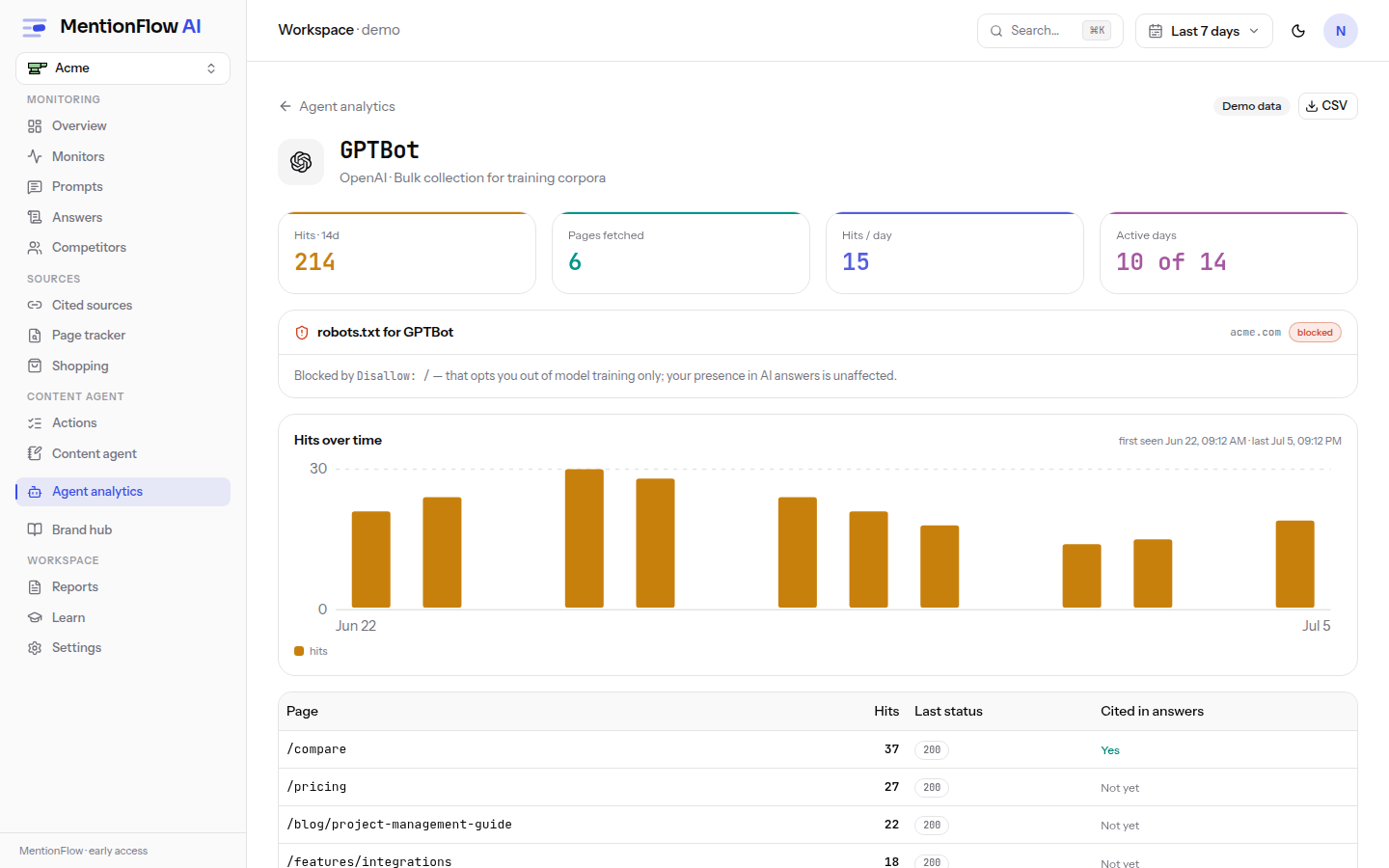
Per-agent robots.txt verdict
Every agent page shows how your site's robots.txt treats that specific crawler. The audit checks your site root and your top cited and crawled paths. An agent allowed at / but blocked from /blog reads blocked, because that is where it counts.
| Verdict | What it means |
|---|---|
| Allowed | A rule names this agent and permits your key pages. |
| Blocked | A Disallow rule blocks it. For a training crawler that only opts you out of model training. Your presence in AI answers is unaffected. For a search-index or live-fetch crawler it removes you from the answers that agent feeds, not just from training data. |
| Not addressed | No rule names this agent, so it falls through to your defaults (the * group). |
| Couldn't check | robots.txt couldn't be fetched (DNS, timeout, or a 5xx). The verdict is unknown, not a green light. The site may well be blocking the agent. MentionFlow retries on the next view. |
When no robots.txt exists at all, the page says so plainly. Nothing is blocked or steered, so the agent may crawl freely.
Crawl-to-citation, per page
The pages table joins each fetched path to your tracked answers, so you can see whether a crawled page went on to be cited:
| Column | Meaning |
|---|---|
| Page | The path fetched (query strings are never stored). |
| Hits | Times this agent fetched it in the window. |
| Last status | The most recent HTTP status; 4xx/5xx are flagged. |
| Cited in answers | Yes, Not yet, or an em-dash. |
The em-dash is deliberate. When no tracked answers were collected in the window to join against, "never cited" would be a claim the data can't back. So the column shows — and a note explains why.
Honest empty states
Zero hits for an agent is never a 404. It is one of two findings. If logs are connected, the page says the agent simply hasn't fetched anything in this window. That is normal for training and index crawlers, which visit in bursts weeks apart. The exception: when nothing has arrived from any agent for 7 or more days, it warns that the log pipe itself looks quiet, so the absence may be missing data rather than a missing crawler. If logs are not connected, it points you to the three ingest paths. When the agent is also blocked in robots.txt, the empty state names that as the likely reason.
Where an agent has hits, its pages table exports to CSV.
How it's computed
The crawl-to-citation rate is the count of distinct crawled paths that also appear as own-domain citation paths, divided by the distinct crawled paths. It is null (em-dash) when nothing has been crawled, per the data-honesty rule.
"Connected" means any event has ever arrived, not just within the current window. So an empty window on a connected site is itself a finding. Only paths are stored, never query strings. That is a privacy rule.
Freshness is unwindowed: it is the latest event time. The pipeline reads "silent" after 48 hours even when a connect marker exists, because a marker only proves a deploy happened, not that events are still flowing. A robots.txt audit flags any blocking of non-training agents, which would remove you from the answers.
Limits
The live dashboard is a Growth-plan feature and is enforced. Demo mode stays open to everyone. Uploads are capped at 5 MB, REST batches at 10 MB, and re-uploading the same log is idempotent.
Related
- Crawler ingest: setup for the three ingest paths.
- Sources: the citations crawled pages are matched against.
- API keys: the ingest-scoped key the Worker uses.
- Ingest endpoint:
POST /api/v1/crawler-events(see API resources).