Shopping overview
How MentionFlow tracks the product carousels AI engines show on your prompts, and matches them against your own catalog.
AI assistants have become storefronts. Ask one for "the best running shoes under $150" and it does more than describe options. It shows a product carousel: a shelf of products with prices and images. Your products are on that shelf or they are not. Shopping is how you find out.
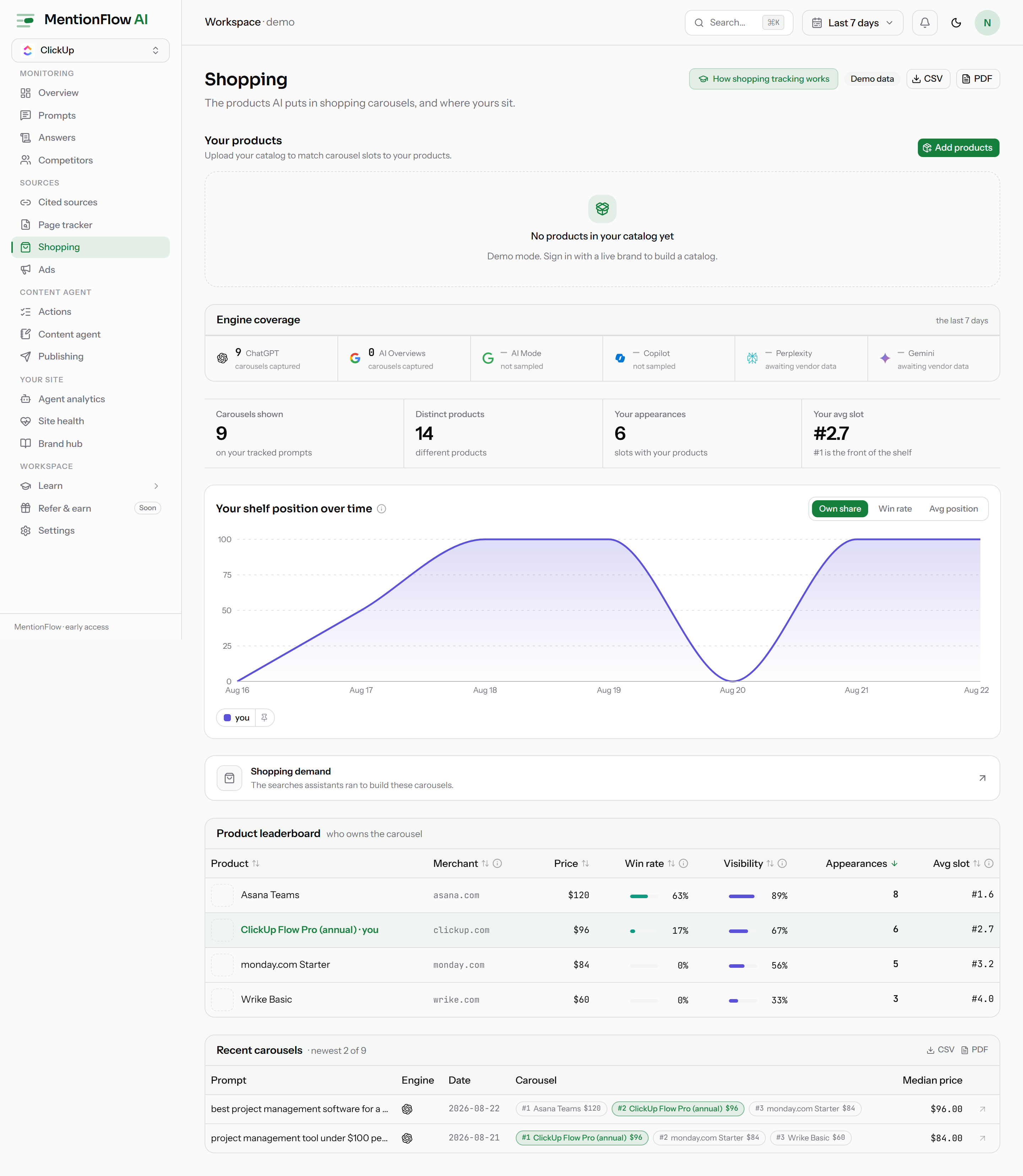
MentionFlow watches the carousels AI engines show on your tracked prompts. It matches the products in them against a catalog you upload. You see where your products land, how often, and against whom.
What it does
Three words matter here:
- A placement is one product in one slot of one carousel.
- A carousel is the set of placements from a single run. It is the shelf as the engine showed it that time.
- Placements are matched against your own uploaded product catalog. The numbers describe your products, not the shelf in general.
Four engines carry shopping data today: ChatGPT, Google AI Overviews, Google AI Mode, and Copilot. Perplexity and Gemini are wired and waiting on vendor data. See Engine coverage for the per-engine picture.
How to use it
The section has these pages:
- Analytics home: summary tiles, a trend, a product leaderboard, and the most recent carousels.
- Engine coverage: which engines the shelf data comes from, and how to read the coverage strip.
- Catalog: your uploaded products, matched to the placements engines showed.
- Product detail: one product's shelf performance across the carousels it appeared in.
- Imports: add products by CSV, Shopify, or Google Merchant Center.
- Shopping demand: the searches assistants run while building carousels, ranked Top / Trending / Losing / New.
Open the section at /shopping in the app.
How it's computed
Shopping metrics use a rolling 7-day window and count active-prompt runs only. A paused or archived prompt's old carousels do not feed today's numbers.
Each engine's payload format has its own parser. The leaderboard, totals, and trend blend every collecting engine into one view of the shelf. Placements are joined to your uploaded catalog. So a product shows up only once you have imported it and it clears the matching gate described in Catalog.
Limits
- Engine coverage varies. ChatGPT, Google AI Overviews, Google AI Mode, and Copilot collect today. Perplexity and Gemini are wired but waiting on vendor payloads. See Engine coverage.
- Live workspaces only. The demo workspace shows labelled sample data, in line with how MentionFlow handles missing data.
Related
- Engine coverage
- Catalog
- Imports
- Product detail
- Analytics
- Shopping demand
- Product attributes
- Ads intelligence: the paid units next to these organic carousels
- API resources