Sources and citations
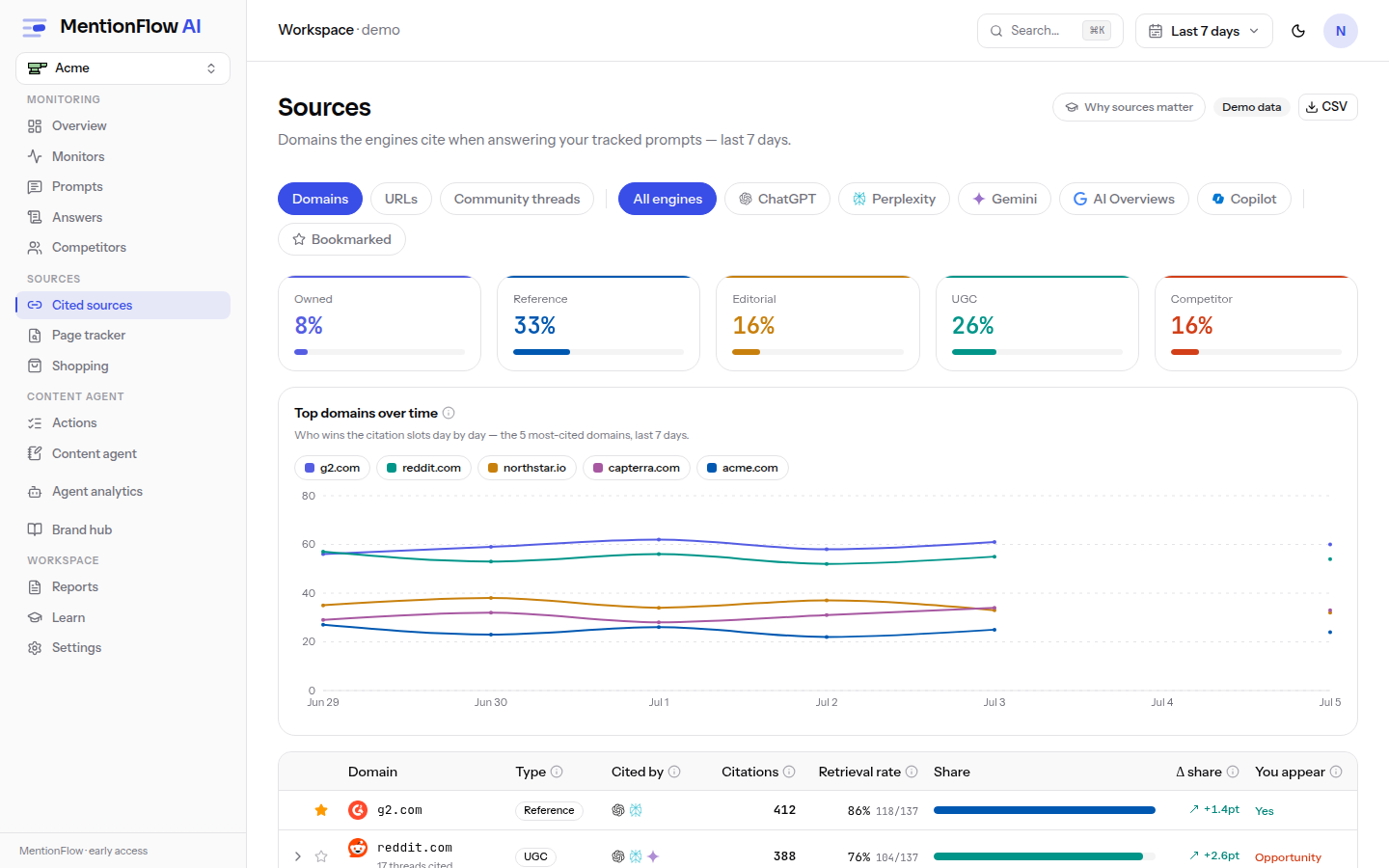
The domains and community threads engines cite when answering your prompts, classified and ranked, with "you appear" and "opportunity" flags and per-domain drill-down.
AI assistants do not invent their answers. They read the web and cite it. Sources shows which websites and community threads they read when answering questions about your category. That is your playbook: earn your way onto the pages assistants already trust, and you earn your way into the answers.
What it does
Every cited link across your answers is collected, classified, and ranked here. Each source is flagged for where you already appear and where there is an opportunity you are missing.
How to use it
- Domains view. Class-share tiles sit above a top-20 table with expandable YouTube / Reddit / Quora rows. Source classification and page type are icon-glyph FilterSelect menus, so a long list of classes narrows in one place.
- Filter by which brands are mentioned. The Domains view and the URLs view both carry a brand-mention filter. It narrows the table to sources whose citing answers name the brands you choose. Its trigger reads "Any brand mention" until you pick something.
- Pick who counts. Choose your own brand (its row is tagged (you)), any tracked competitor, or several at once.
- Set how they combine. With two or more picked, a Match toggle decides. All brands (AND, the default) keeps only sources whose citing answers mention every brand you picked. Any brand (OR) keeps those mentioning at least one. Picking every brand is still a real filter, because plenty of cited answers mention nobody at all and those drop out.
- Share it, and switch views freely. Your selection lives in the URL (
?mentioned=, plus?mentionedMode=when you switch to Any), so a filtered view is a link you can share. Moving between Domains and URLs keeps the filter. Only the Community view drops it, since it has no cited-source rows. If a shared link names a brand you no longer track, that name is quietly dropped rather than blanking the page.
- Preview a media citation. YouTube and Reddit citations open a rich media card, and clicking one opens a modal. YouTube shows the thumbnail, duration, view count, a privacy-preserving (nocookie) embed, and a stat row. Reddit shows upvotes, comment count, and the linked subreddit. You can judge a cited video or thread without leaving MentionFlow.
- Community view. The threads engines cited, your presence in each thread, and related discoveries worth joining.
- Drill down. Open any domain at
/sources/[domain]for its detail.
How it's computed
Classification (owned, competitor, editorial, ugc, reference, social, other) comes from curated root-domain lists, not a language model. The owned and competitor classes are re-derived at read time from your current brand config, so changing your brand's domains re-labels the sources at once.
Aggregation and honesty rules:
- The class-share tiles cover all cited domains, not just the visible 20.
- The share delta is in percentage points of citation share, so volume does not skew it. With no baseline it is null and reads "new".
- URL variants collapse to one canonical key, so
www, trailing slashes, and query noise do not split a domain into duplicates.
In the Community view:
- Threads are distinct canonical keys.
- "Brand in thread" has three states: Yes, "No" (with a "join this conversation" nudge), or "not checked yet". A null never fakes a No.
- Related threads show "—" citations, never a made-up zero. See data honesty.
Limits
- Display caps: 20 domains, 12 row-expansions, 50 threads, 25 related.
- There is no plan gate.
- CSV export is available.
Related
- Citation share: the metric behind the class-share tiles.
- Actions: turn an "opportunity" flag into a task.
- Google Search Console: connect your own search data.
- API / MCP:
GET /api/v1/sources(capped at 20; fieldsdomain/classification/citations/brand_present) and thelist_sourcesMCP tool.