Engine coverage
Which AI engines put products on your shelf today, which are wired and waiting on vendor data, and how to read the coverage strip.
Shopping data no longer comes from one engine. This page says which engines carry product carousels today, and which are wired but waiting on their data vendor. It also explains how to read the Engine coverage strip on /shopping, including its two different kinds of "no data".
Where shopping data comes from today
| Engine | Status |
|---|---|
| ChatGPT | Collecting today |
| Google AI Overviews | Collecting today |
| Google AI Mode | Collecting today |
| Copilot | Collecting today |
| Perplexity | Wired, awaiting vendor data |
| Gemini | Wired, awaiting vendor data |
Claude, DeepSeek, Grok, and Mistral answer through model APIs with no shopping surface, so they never appear here.
"Wired, awaiting vendor data" means our extraction is ready but the vendor's answer records carry no product fields yet. Perplexity's record has a shopping field that has never arrived populated. Gemini's record has no product field at all. A request for both is filed with the vendor. The day a populated record arrives, it parses and shows up, with no software update needed. Until then those engines show an em-dash, never a fake zero.
All shopping metrics blend every collecting engine into one view of the shelf. The coverage strip is the only per-engine breakdown.
Who it's for
- Anyone reading the shopping numbers who wants to know which engines the shelf represents before quoting it.
- Teams deciding which engines to sample. The strip shows when a shopping-capable engine is not being collected at all.
Try it: read the coverage strip
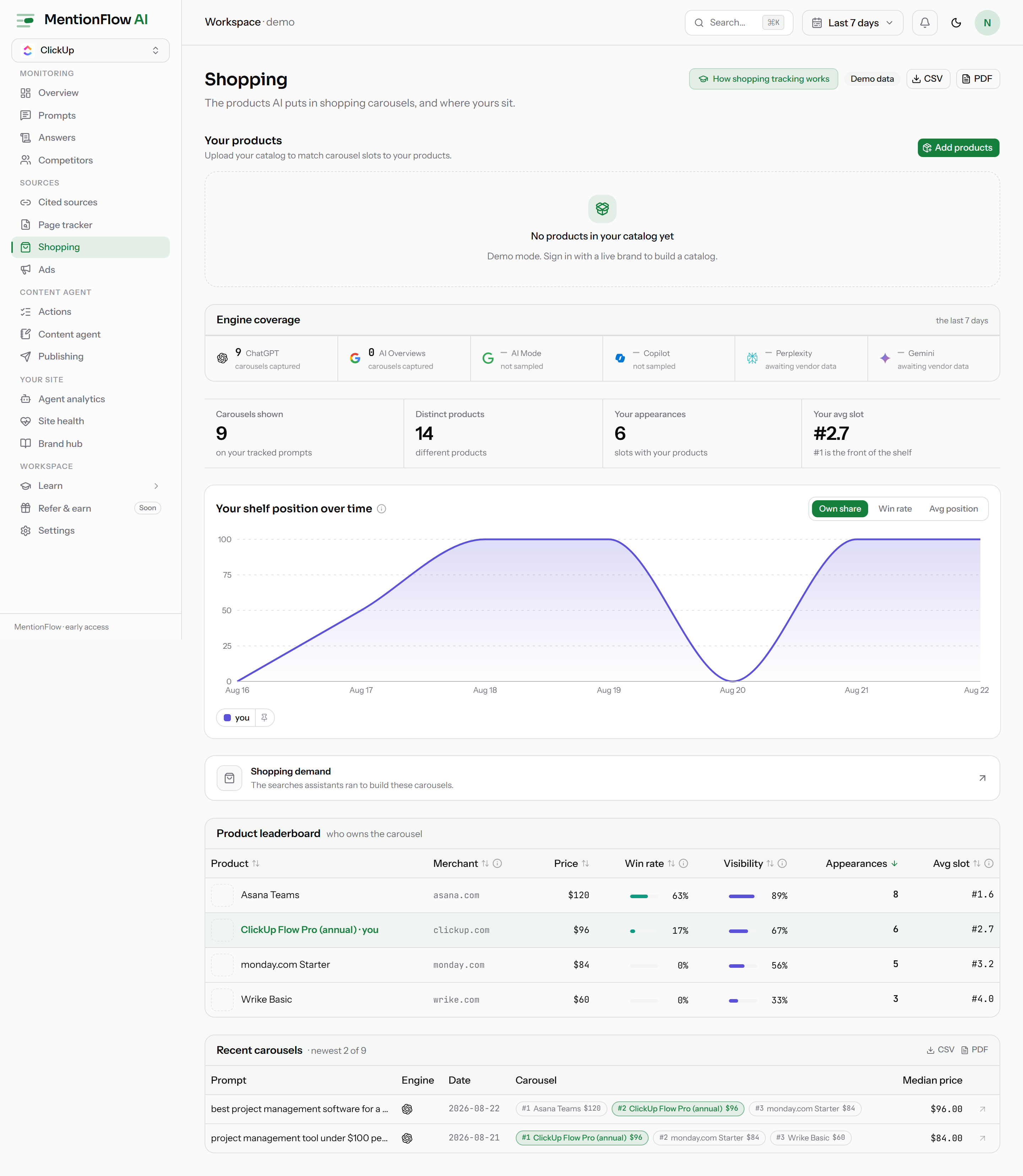
- Open Shopping. Near the top is a strip headed "Engine coverage", captioned "carousels captured per engine, last 7 days" (it follows your selected range).
- Each engine cell shows one of three states:
- A number with "carousels captured". The engine was collected this window and this is how many carousels it showed. A 0 is a real observation: the engine ran on your prompts and showed no carousel.
- An em-dash with "not sampled". The engine can deliver shopping data, but none of its runs were collected this window. Turn it on at Engines to start capturing.
- An em-dash with "awaiting vendor data". Collection is wired, but the vendor's payload carries no product data yet (Perplexity and Gemini today).
- Hover any cell for the full explanation of its state.
- If you filtered the page by category or merchant, the caption adds "filters not applied". The strip always shows total coverage, so a narrow filter cannot make an engine look silent.
Those two em-dash states differ on purpose. "Not sampled" is fixable by you: turn the engine on. "Awaiting vendor data" is not: the vendor has to ship the field. Neither is a zero.
The honesty gates
Two rules keep multi-engine carousels honest:
- Google products only count next to a real AI answer. Google's results can include ordinary Shopping modules that have nothing to do with AI. We count AI Overviews shopping blocks, and the carousel beside them, only when the result actually showed an AI Overview. Counting a plain Shopping module on an answerless page would credit the AI shelf with placements the AI never made.
- Copilot cards must show commerce evidence. Copilot's product field also fires on non-shopping answers, as plain entity mentions. A record counts as a carousel only when its cards carry a price or a rating. So a list of name-drops can never fabricate a shelf.
How it's computed
- Each channel's payload format has its own parser, with a generic fallback shared by all engines. The per-engine status (collecting today, awaiting vendor data, no shopping surface) is one coverage map, used by the strip and the API alike.
- A cell's count is null exactly when unobservable: the engine was not sampled, or the vendor payload is missing. Otherwise it is a number. Null is not zero. A 0 is a measured absence. Same rule as everywhere else in data honesty.
- The strip ignores page filters on purpose. It is computed before category and merchant filtering. That is what the "filters not applied" caption means.
- Structured prices from the new channels (an exact amount plus currency) are stored as-is. The verbatim price text stays empty when an engine sends only numbers, and a display price is built from the structured amount. When nothing was sent at all, the price stays unknown, never guessed.
Limits
- Perplexity and Gemini shopping stay em-dashes until their vendor payloads carry product data.
- Live workspaces only. The demo shows labelled sample data.
Related
- Shopping overview: how carousels are captured and matched to your catalog.
- Shopping analytics: the blended leaderboard and trend the strip sits above.
- Workspace and members: the Settings surface where you enable an engine that shows "not sampled".
- API resources: the
channel_coverageblock onGET /api/v1/shopping. - Data honesty: the null-is-not-zero rule the strip follows.