Prompts
The tracked-prompt portfolio. Per-row window metrics, bulk CSV import, topic folders, tags and stages, and a per-prompt detail view with run diffs.
Prompts is where you decide which questions MentionFlow watches for you. Every metric in the product is built from the answers, so this page shapes everything else. Put in the questions your buyers actually ask, and the dashboard starts reflecting your real market.
What it does
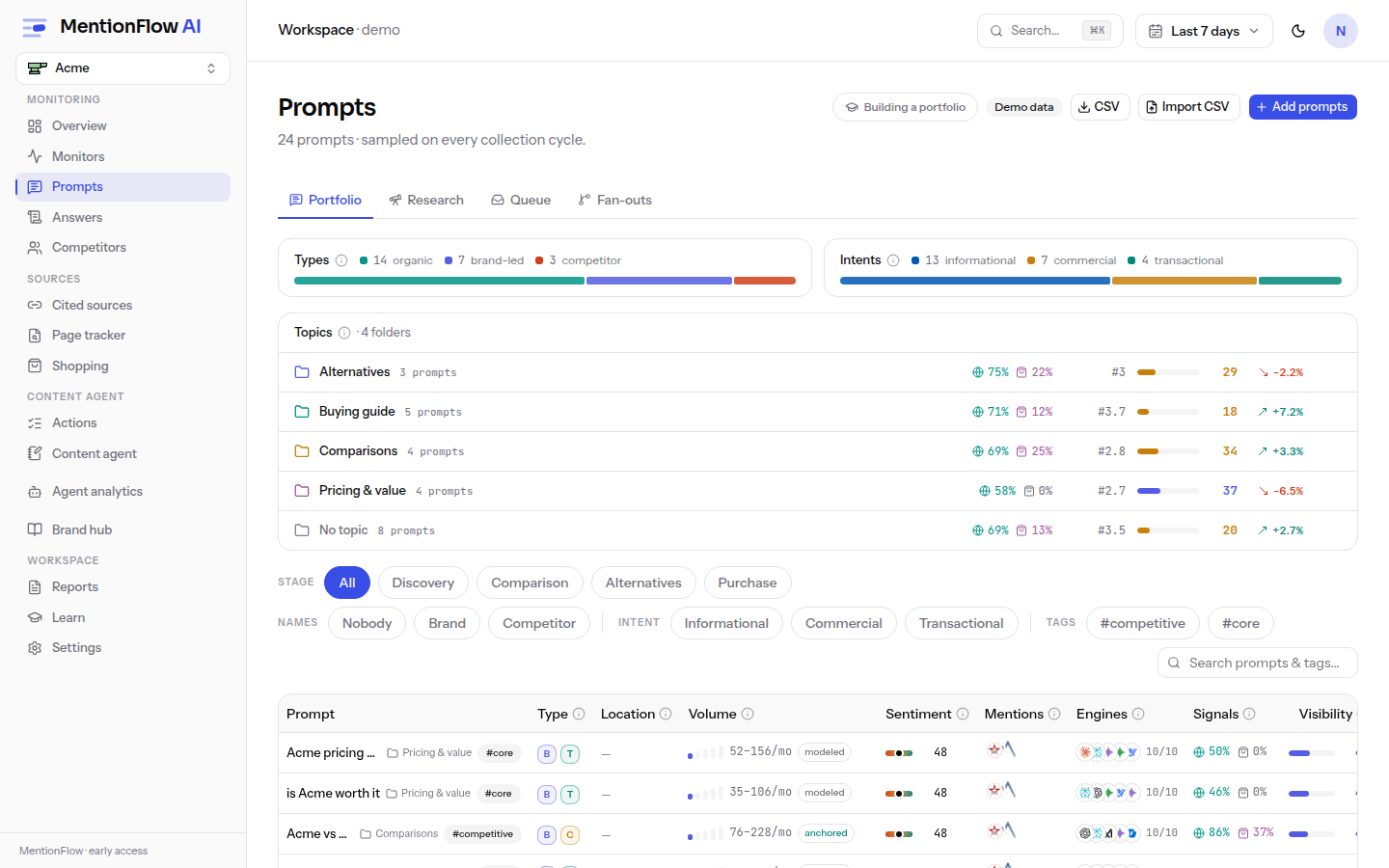
The prompts screen turns a list of plain-language questions into a working portfolio. Each row carries the standard window metrics for that prompt. You can filter, tag, folder and bulk-import the whole set. A per-prompt detail view opens the full history behind any row.
How to use it
- Filter and sort.
/promptsfilters by stage, category, intent, tag, and topic through icon-glyph FilterSelect dropdowns. All are URL params, all combine, and sorting lives in the URL too, so any view is a shareable link. The topic filter takes several topics at once as a comma list, matching a prompt in any of them, and each Topics-card row toggles its own topic in and out. A tracked-count waffle card shows how much of your quota is in use, and a Date added column records when each prompt entered the portfolio. - See mentions inline. Each row's mentions count works on hover and click. Hover for the brands named in that prompt's answers. Click to open the receipts behind it.
- File into topics inline. A prompt can belong to several topics at once (the TAGS model), and the Topics card lists your topics. The inline "+" on a row opens a multi-select checklist, so you tick topics without leaving the table. The row flips at once, then settles against server truth. The cell chips the prompt's primary topic, plus a "+N" chip tooltipped "Also in: …" when it belongs to more. A prompt filed nowhere shows "Not filed in any topic yet".
- Add prompts. Inline add lives in the
#managepanel, with a minimum of 8 characters. The header "Add prompts" is a menu: the guided flow at/onboarding, CSV import, and the suggestion queue. - Manage a row. The row menu sets tags, topics, persona, language, and a per-prompt location, and it does pause, resume and archive. Its Topics submenu toggles each membership on or off. Archived prompts live at
?status=archived. - Open a prompt. The detail page shows a headline metric, a per-engine sentiment strip, a fan-out card, answer tabs, and run diffs showing how an answer changed between collections.
- Import a CSV. Up to 2 MB and 500 rows, delimiter auto-detected, with a downloadable template. The preview shows ready / duplicate / invalid counts, a quota line, and the first 50 rows. Confirming is what writes them.
- Work in bulk. Select many prompts to tag, add to topics, relocate, pause, archive, or restore them in one click. Narrow the set first with the search box and multi-tag filters. Bulk topic assignment is additive: it adds the chosen topic without touching the topics those prompts already hold. A separate Clear topics removes them all. See Batch actions and search.
Archive and restore
Your prompt quota is pooled per workspace. Active and paused prompts both hold a slot. Only archiving frees one. Archiving stops collection but keeps all of a prompt's history, so it is the safe way to make room.
Reclaim a slot:
- On
/prompts, open the row menu of a prompt you no longer need and choose Archive, or select several and archive them together. The slot is freed at once. - Add your new prompt as usual.
Bring an archived prompt back:
- Switch to the archived view at
?status=archived. - Select the prompt, or several, and choose Restore. Restored prompts hold plan slots again, so the batch is re-checked against your quota first.
- You can also re-import an archived prompt from a CSV.
Pausing keeps the slot. A paused prompt still counts against your quota, so you can resume it instantly. See Plans and quotas.
Tag groups and colours
Tags on a prompt are free-text labels. You type a word, and the same word is the same tag everywhere. Tag groups sit on top of that without changing it. A group is a named set of your tag strings that all share one colour. A family of related tags, say every campaign tag, then reads as one thing instead of blending into a long flat list.
Groups live behind the Tag groups button beside the tag filter on /prompts. Its tooltip reads "Organize tags into named groups sharing a color". Open it, create a group, give it a name and a colour from the palette, then click any of your tags to file them in. Click a tag again to pull it back out. A tag belongs to at most one group, so filing an already-grouped tag somewhere new just moves it.
Once a tag is grouped, its colour follows it around the page:
- On each prompt row, a grouped tag chip carries a small coloured dot in its group's colour. Ungrouped tags look exactly as they always did: a plain badge, no dot.
- The tag filter menu is sectioned by group, each section headed by its colour. Everything ungrouped is gathered under an "Other tags" heading at the bottom.
Grouping never changes what a tag is or how filtering behaves. A group matches your tags by their exact, literal text, the same match the ?tag= filter uses, so grouping campaign never sweeps in campaigns. Deleting a group removes only the colouring. The tags stay on their prompts as plain ungrouped badges.
Limits. Up to 20 groups per brand, group names up to 60 characters. Group names ignore case, so "Campaigns" and "campaigns" are one group. A group's colour is a standard 6-digit hex (#rrggbb) chosen from the palette in the manager.
One thing to know before you recycle a tag name. A group remembers the exact tag strings you filed into it, even after the last prompt using one is edited away. The tag just disappears from view while no prompt carries it. If a new prompt later uses that exact name, it rejoins its old group and picks the old colour back up. That is usually what you want. It only surprises you if you retire a tag name and reuse it for something unrelated. To stop that, un-group the tag before you stop using it, while it is still visible in the manager.
How it's computed
Row metrics use the standard core math over your selected window: visibility and sentiment. An em-dash in sentiment means no scored brand mention yet, not neutral. Deltas are computed on unrounded values, so a rounded display can't invent a change.
One window quirk to know: on the prompt detail page the headline visibility is fixed at 7 days and the per-engine sentiment strip is fixed at 28 days, while the prompt list follows your selected range. The fixed windows keep the detail view stable. See data honesty.
CSV import is built to be safe and repeatable:
- Dedup identity is
trim + collapse-whitespace + lowercase, shared byte-for-byte with the suggestion queue and with topic keys. So the same text is the same prompt everywhere. - Dedup checks active and paused prompts only. Archived prompts are re-importable.
- Topics are resolve-only. An import matches an existing topic but never creates one.
- The import is all-or-nothing against your quota. It re-checks the quota inside a locked transaction, so a concurrent import can't overshoot your limit.
Topics hold up to 50 per brand, with names up to 60 characters. Each prompt has one primary topic, the one its cell chips first and links to. The rest ride along as "Also in" memberships.
Topic metrics count each prompt fully in every topic it belongs to, so the per-topic counts can add up to more than your portfolio total. That is honest, not double-counting. Within any single topic row, every prompt and run is aggregated over a distinct set, counted exactly once, so no share can inflate past a true fraction of that row.
Deleting a topic deletes only the topic. Its prompts keep collecting, keep their history, and keep any other topics they are filed under. Only prompts filed nowhere else fall back to "No topic".
Limits
- Prompts are pooled per workspace. Archiving frees a slot, pausing does not. See Plans and quotas.
- Import is blocked in demo mode and requires editor rights.
Trends
/prompts/trends is a movement matrix. For each tracked prompt it shows how its metrics moved from the prior comparable window to the current one. You see which questions are gaining or losing ground, not just where they stand today. It shares the prompts page's filters and the same selected window.
The comparison is honesty-gated. Trends only draws a movement column when a real prior window exists to compare against. The gate is anchored on the newest run in scope (trendsWindows()), so a range whose data trails the picked end date won't manufacture movement from a truncated baseline. With no comparable prior period, the page shows an amber "No comparable prior period" banner and drops the Trend column instead of inventing a delta. That follows the data-honesty rule and keeps the trends matrix in agreement with the portfolio table one tab over.
When new prompts are added partway through the period you are reading, the Overview trend charts mark that day with a prompt-change marker. A step up in the line then reads as added coverage, not organic movement. Only additions are marked. Edits, pauses and archives are not timestamped, so MentionFlow has no event to draw. See Date ranges.
Related
- Suggestion queue: accept suggested prompts into the portfolio.
- Research: where many suggested prompts come from.
- Fan-outs: the searches on the prompt detail card.
- Plans and quotas: the pooled prompt quota.
- API / MCP:
GET /api/v1/promptsand thelist_promptsMCP tool.