For content & SEO teams
Run the whole loop. Find the questions AI assistants answer, draft against your own facts, publish, and track whether the page earns citations. Plus source intelligence, crawler analytics, and an llms.txt generator.
Classic SEO optimizes a page to rank. Generative-engine optimization asks a harder question. When an AI assistant answers on your topic, does it read your page, name your brand, and cite your URL? Or a competitor's?
MentionFlow closes that loop. You find the questions assistants answer, draft against your own verified facts, publish, and watch whether the page earns citations in real AI answers. Every step rests on what engines actually did.
Find the questions worth answering
Two surfaces turn real demand into a prompt list:
- Research combines real search-demand data with a language model to produce around 32 candidate prompts, at least 80% unbranded and clustered. It also carries a Google Search Console striking-distance block: queries you already rank 8 to 20 for with real impressions. Those are the near-misses a good page can convert.
- Fan-outs are the web searches an assistant ran while answering your prompts, lifted word for word from the stored payload. Never simulated. Today that field comes from ChatGPT and Perplexity. Each query is one click from becoming a tracked prompt.
Both feed the suggestion queue, so your editorial calendar grows from observed demand.
See where your content already covers — and doesn't
The Content surface opens on its Overview. Its Coverage tab holds the coverage map: which tracked prompts your published site addresses, and which it does not.
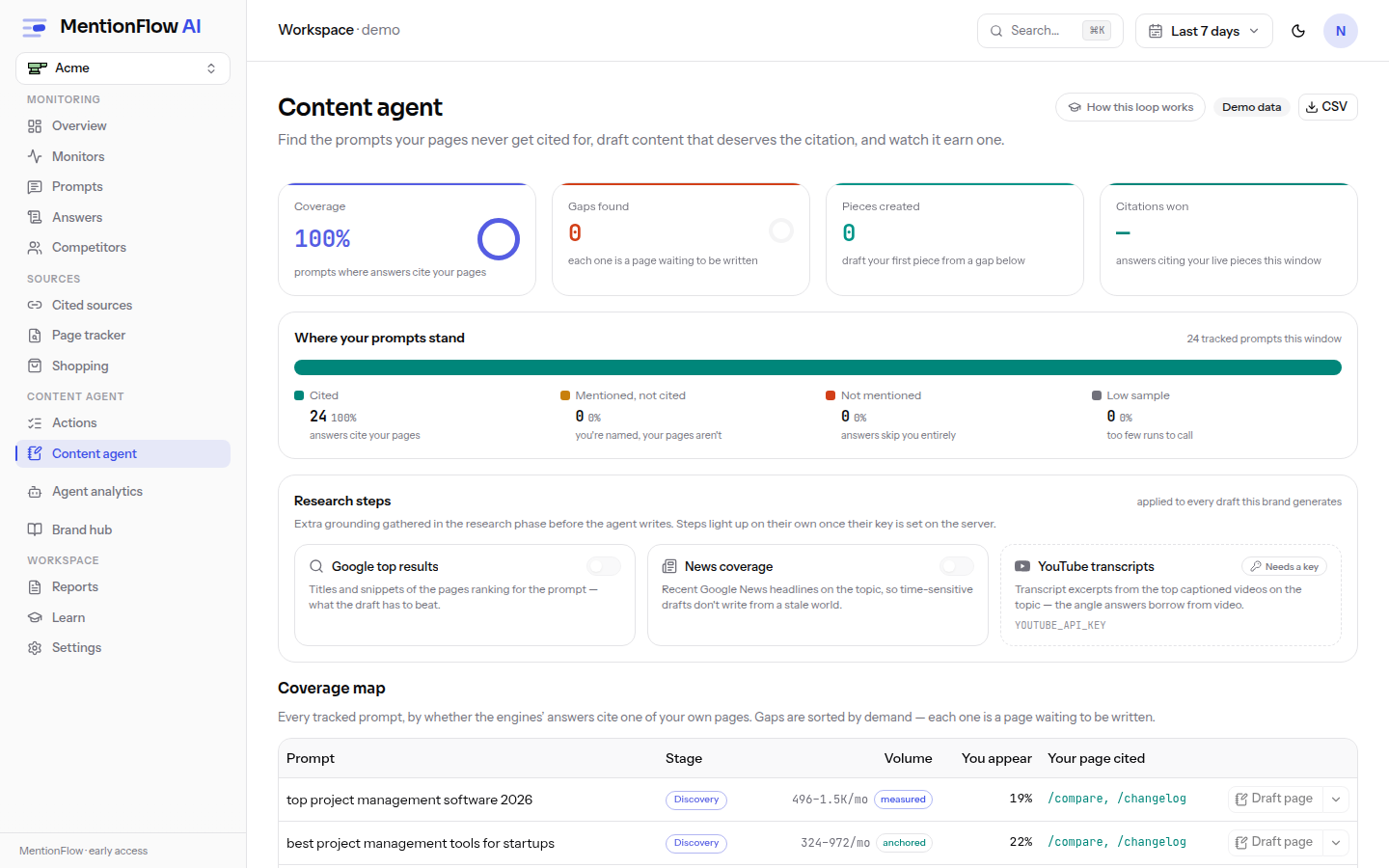
Coverage is covered divided by prompts with at least three runs. A low-sample prompt reads "too few runs to call" and stays out of the denominator, so coverage is never computed on a sample too thin to trust. Under the hood it picks the single nearest embedded page per prompt and buckets the similarity: excellent at 0.50 and up, good at 0.42 and up, medium at 0.34 and up. A "gap" is a real content hole, not a guess.
Draft against your own facts
The content agent writes briefs and full drafts grounded in your brand knowledge base. That is a structured fact sheet plus a longer-document library, chunked, embedded, and retrieved (top 5 by similarity) at draft time. It never invents facts and never contradicts your "never claim" list.
- The research phase can also pull Google top results, news coverage, and YouTube transcript excerpts. Each step turns itself on only when its server key is set. A keyless step reads "Needs a key" and never runs silently. The article page lists which inputs grounded each draft. A count of 0 means the step ran and found nothing.
- A draft is editable in place. Saving marks it "Edited by hand", and nothing regenerates over your words without an explicit action.
- Draft generation is metered per UTC calendar month across the workspace, checked before the paid model call. Briefs are available on every plan. See Plans and quotas.
Briefs also launch straight from an Actions card or a Competitors gap. A measured miss becomes a grounded brief without leaving the loop.
Publish, then track the payoff
Taking an article Live requires a published path. That URL is the key MentionFlow uses to follow the article. From then on, citations-won counts only live articles. The daily trail is recorded by the collection cycle and outlives the dashboard window, so the article page charts every calendar day since tracking began.
A day the cycle did not run is a gap, not a zero. A stored 0 always means runs happened and the path went uncited. That distinction separates "we didn't measure" from "we measured and it wasn't cited".
For any URL, yours or a competitor's, the Page tracker at /pages is a lens over the citations you already collect: which engines cite the page, for which prompts, and how often, with a daily trail. It does no crawling. It reads stored citations. Connect Google Search Console and it shows your real Google impressions and clicks next to each page's AI citations.
Know which sources shape the answers
Sources is the citation layer: every domain and community thread engines cite when answering your prompts. Each is classified as owned, competitor, editorial, UGC, reference, or social, from curated root-domain lists rather than a language model, and flagged for where you appear and where there is an opportunity.
The owned and competitor classes are re-derived at read time from your current brand config, so fixing your domains re-labels sources right away. The community view has three states for your presence in a thread: Yes, "No: join this conversation", or "not checked yet". A null never fakes a No. This is your PR target list: the sites and conversations you need to be in to change the answer. Citation share is the metric behind it.
Make sure the crawlers can read you
None of this works if AI crawlers cannot fetch your pages. Crawlers is a Growth-plan feature, though the demo stays open. It connects your server logs to your results: which agents (GPTBot, ClaudeBot, PerplexityBot, and others) fetch your site, for what purpose (training, search_index, user_fetch), and whether a crawled page went on to be cited.
The per-agent robots.txt verdict is the one to watch. It is honest about its own certainty:
| Verdict | What it means |
|---|---|
| Allowed | A rule names the agent and permits your key pages. |
| Blocked | A Disallow blocks it. For a training crawler that only opts you out of model training. For a search-index or live-fetch crawler it removes you from the answers that agent feeds. |
| Not addressed | No rule names the agent; it falls through to your * defaults. |
| Couldn't check | robots.txt could not be fetched (DNS, timeout, 5xx). The verdict is unknown, not a green light. MentionFlow retries on the next view. |
Getting logs in takes a one-click Cloudflare Worker, a log upload, or a REST feed. Only recognized AI agents and paths are stored, never query strings.
Ship an llms.txt
Give assistants a clean, machine-readable summary of your site with the free llms.txt generator. It is the same builder that produces MentionFlow's own /llms.txt. Fill in your name, a one-line summary, and your key pages, then copy the file to your site root.
The loop, in one line
Research the questions, read your coverage, draft against your own facts, publish with a tracked path, and watch citations-won climb. Sources tells you which domains to earn. Crawlers confirms the bots can read you. The Page tracker proves whether a URL is winning the citation. Every number traces back to a receipt you can open and read.
Related
- Content: coverage, briefs, drafts, and citation tracking.
- Sources and citations: the classified domains shaping your answers.
- Crawlers: which AI agents fetch your site, and the robots verdict.
- Research and Fan-outs: real, trackable demand.
- Brand and knowledge: the ground truth drafts are written from.
- Citation share: the metric behind Sources.