Answers and receipts
A receipt is one completed answer run: what one engine said to one prompt on one date, with its ranked mentions, sentiment evidence, and citations.
A receipt is one completed answer run. It records what one engine said to one prompt on one date, with its ranked brand mentions, sentiment evidence, citations, and any ad or shopping surface. Every metric in MentionFlow traces back to one of these.
What it does
Answers is the ground truth under every chart. A metric is a number. A receipt is the answer that produced it: the engine's text word for word, plus everything MentionFlow read from it. To find out why a number moved, open the receipts behind it.
How to use it
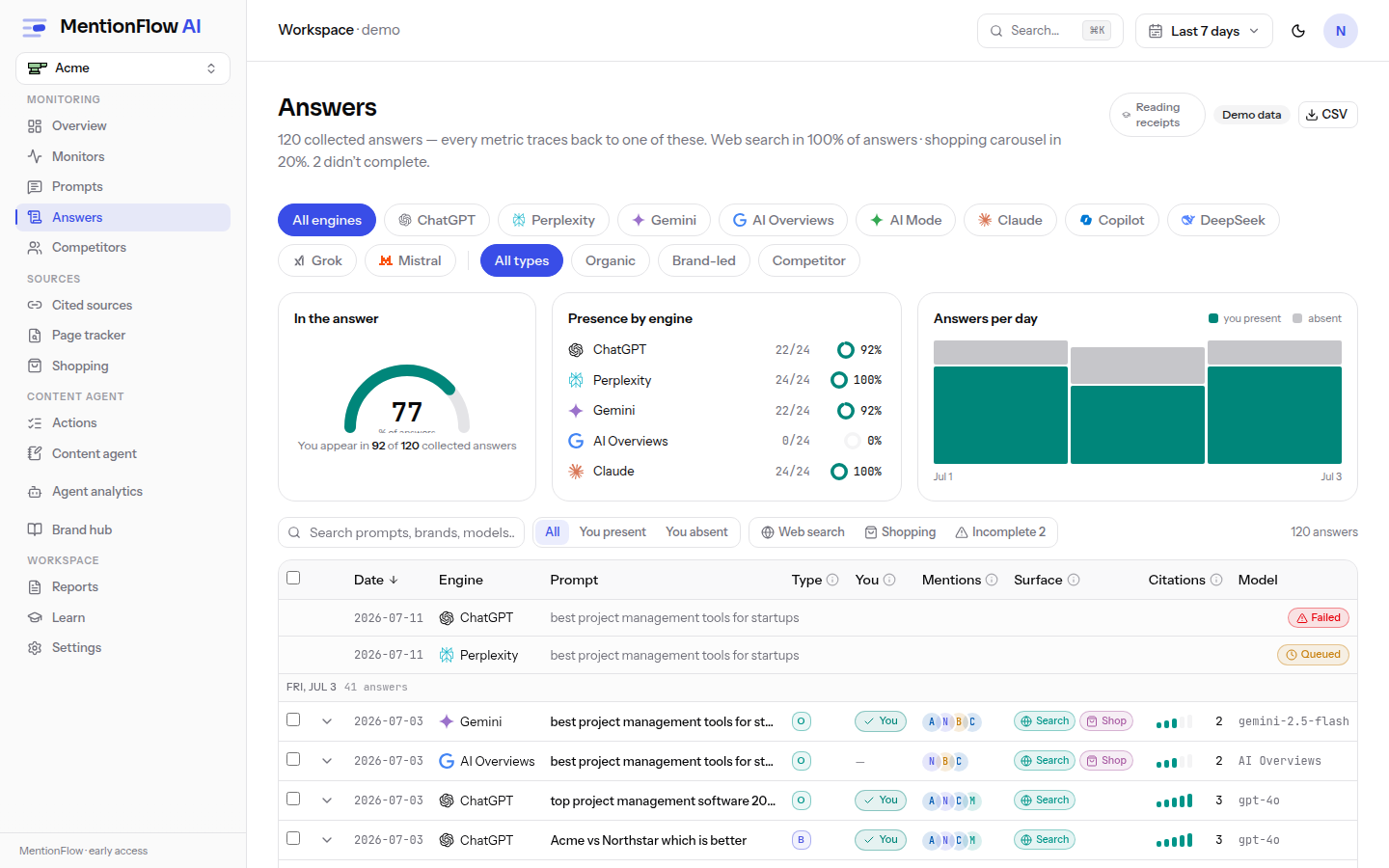
- Scan the feed. It shows up to 500 rows, with an engine multi-select and type filter, a presence summary, and a sortable table. Each mention cell leads with the brand's logo, and every engine carries its model label, so you know which model version answered. Click a row's chevron to preview the full answer in place. The text loads on demand, so you can skim several engines without opening each one. For the full record, follow Open receipt.
- Read the over-time chart. A stacked answers-over-time chart sits above the feed, one band per engine. It honours the same engine and type filters as the table. On an empty filtered scope it has nothing to draw.
- Trust the metrics boundary. Incomplete runs (queued or failed) sit in a separate strip and never enter metrics.
- Fact-check across engines. An optional knowledge-base fact-check card checks how accurately the engines describe you. It wears a staleness pill when the answers it checked are older than the current window. See Fact check below.
- Open a receipt. Click a row for
/answers/[runId]: the highlighted answer text, "Brand ranking in this answer" (every mention in order, untracked ones included, each with a Track button), the citations, sponsored-ad and shopping cards, and per-engine mini-stats. - Walk the list from a receipt. Every receipt you open from the feed has previous / next arrows and a position counter ("3/12"), so you can step through answers without going back to the list. The walk follows the feed's current order and filters: engine, type, search, presence, Web search / Shopping surface, and sort. So "next" means the next answer as the list was showing it. Each step keeps those choices in the URL, so the walk stays shareable. The arrows only appear when your answer is part of that filtered list, so a stale link or a different date range shows none.
Reading a receipt
Open a receipt from any feed row, or from a prompt's detail page. It shows exactly what the engine said and what MentionFlow read from it.
- Hover a brand mention. On a receipt (
/answers/[runId]) the brand names in the answer are highlighted. Hover one for a card with its position (for example "Mention #2 of 5"), its sentiment (or unscored when the run wasn't scored), whether the brand is you or untracked, and the verbatim quote the sentiment was read from. - Follow a citation. Where the answer links to a source, the link carries that site's favicon. Hover it for a card with the domain, its source classification, the page title, and a Source intel link through to that domain under Sources. A +n marker means the engine folded that many more sources behind it, and the full list is in the citations panel. Citation cards appear on both the receipt and the prompt detail page.
- See what the sentiment was read from. Positive and negative mentions shade the exact passage the score came from, teal for positive, rust for negative, so you can audit any score down to the sentence. Neutral and unscored mentions stay unshaded. A short legend ("read as positive" / "read as negative") appears whenever a passage is shaded.
How it's computed
Extraction runs in two passes:
- A deterministic pass decides presence and order: who is mentioned, and in what sequence.
- A language-model pass (temperature 0, strict JSON) produces the canonical cross-brand mention order, plus sentiment and an evidence quote.
If the model pass fails, the run falls back to the deterministic result and is marked usedLlm=false. Its sentiment is then "unscored", not neutral. The system declined to judge. It did not judge the mention as middling. See data honesty.
Two more rules keep receipts honest:
- Ambiguous brand names need domain-form evidence before they count, so a common word that happens to match a brand name can't inflate presence.
- Surface stats omit any flag with zero rows rather than printing
0%. An ad surface that never appeared simply isn't listed.
Receipts age out with the data horizon. A receipt older than 56 days returns a 404.
Fact check
The fact-check card asks one question of the receipts: do the engines describe you accurately? It runs on demand only, never on its own. MentionFlow takes the newest answer per engine that mentions your brand (up to 8) and checks their claims against your knowledge base. Back comes a list of real discrepancies: wrong pricing, wrong features, a competitor's capability credited to you. Each carries the engine, the claim as the engine stated it, what your knowledge base says, and a severity. Answers that agree with you are skipped, and plain omissions are never flagged. This checks engine claims against your facts. It does not grade answers or decide general truth.
Three things worth knowing:
- One cached slot. Each run overwrites the last result. There is no history. The card shows the cached result until you re-check.
- Staleness is explicit. After 7 days, one full collection week, every engine has answered again. The card then wears a staleness pill and the API flags
stale: true. Results never refresh themselves. - Cost is metered and shown. Each run is a metered LLM call, about $0.01 to $0.02. The spend appears on the card and as
cost_usdin the API. Results stored before metering show no cost: an honest unknown, never $0.00.
You can also read the result over the API (GET /api/v1/fact-check, the get_fact_check MCP tool), and agents can start a run with the run_fact_check MCP tool. It uses the same compute path and the same cost guards: a fresh cache, and a cap of 24 metered runs per brand per UTC day, shared with the card's button. See the resource reference.
Limits
- The feed is capped at 500 rows.
- Fact-check needs a knowledge base, edit rights, and an OpenAI key.
- CSV export is available at
/api/export/answers.
Related
- Prompts: the prompt each receipt answers.
- Sources: the citations a receipt carries, added up.
- Ads intelligence: the sponsored units on receipts, grouped by advertiser.
- Overview metrics: the metrics receipts feed.
- API / MCP:
GET /api/v1/answers(REST cap 200 rows) and thelist_answersMCP tool (cap 50 rows); the fact check viaGET /api/v1/fact-checkand theget_fact_check/run_fact_checkMCP tools.