For agencies
Run AI visibility for many clients from one workspace. A portfolio rollup, white-label reports on a schedule, client-viewer seats, scoped access, and an audit trail.
You run AI visibility for a roster of clients. Every client wants proof they show up when someone asks an AI assistant for a recommendation, plus a short list of what to do about it. One client at a time does not scale.
MentionFlow runs a whole book of business from one workspace: pooled quotas, a cross-client rollup, scoped access, and reports that carry your name. Every feature named here is shipped today.
One workspace, many brands
A workspace owns your plan and pools its quotas. A brand (also called a project) is one client. On the agency tiers, brands are unlimited, including pitch projects for prospects. So the pooled prompt budget is what really caps coverage:
| Plan | Brands | Pooled prompts | Team seats |
|---|---|---|---|
| Agency Starter | Unlimited | 80 | 5 |
| Agency Growth | Unlimited | 200 | 10 |
| Agency Advanced | Unlimited | 400 | 10 |
Prompts are pooled across every brand. A light client and a heavy client draw from the same pool, so you put coverage where it matters. See Plans and quotas for how each limit is enforced.
Archiving a prompt frees its pooled slot. Pausing does not. When an engagement winds down, archive the brand. Collection stops, and its project slot and pooled prompt quota are freed right away. Every answer and metric is kept and badged archived. Restore re-checks each quota first, so it is never a loophole.
Open on the whole book: the portfolio
With two or more brands, signing in lands you on Portfolio instead of one brand's overview. Accounts with a single brand open on Overview. A brand-new account opens on onboarding.
Portfolio is one row per client, sorted biggest-mover-first. The client who needs attention this morning rises to the top.
- Each brand is measured over its own newest-seven-collected-day window. A client that collected yesterday and one that collected last week are each read against their own freshest data. No averaging a stale brand into a healthy one.
- The delta header cycles through movers, gains, and drops. Brands with missing data always sort last, so an empty client never poses as a top performer.
- A brand more than two days behind the portfolio anchor is flagged stale. Never-collected and dormant brands get their own em-dash tooltips, following the data-honesty rule.
- The open-actions count uses the same definition as the Actions board, so the number you triage from equals the number on the client's own board.
Click any row to switch the active brand and drop into its Overview. The brand switcher moves you between clients without signing out.
The per-client working loop
Inside a client, the workflow is measure, diagnose, act.
- Measure. Each project samples its markets, engines, and prompts on your plan's cadence, which is daily on every paid plan. The markets, the persona, and the project's engine set live in its Collection settings. Each project inherits the workspace default engine set from Engines until you pick its own four within the same slots. The Overview headline (visibility, share of voice, sentiment, citation share) is the client's scorecard. A client active in several markets can hold up to five of them in one project — every prompt is then asked once per market, so each one spends more of your daily checks. Give a market its own project when the client wants its own report, and read the projects side by side in Portfolio.
- Diagnose. Competitors ranks the client against its rivals by Share of Voice and turns each losing prompt into a gap. Sources shows which domains and community threads the engines cited to get there.
- Act. Actions is a running kanban of the fixes with the most impact. They are scored for you, and they close themselves when the data says the gap is fixed. Each card can spin up a content brief grounded in that client's own answers and knowledge base.
Every metric traces back to a receipt, the word-for-word answer an engine gave. So you can always show a client the exact answer behind a number.
Client-ready reports, under your name
The hub at Reports is where the work becomes something you hand a client.
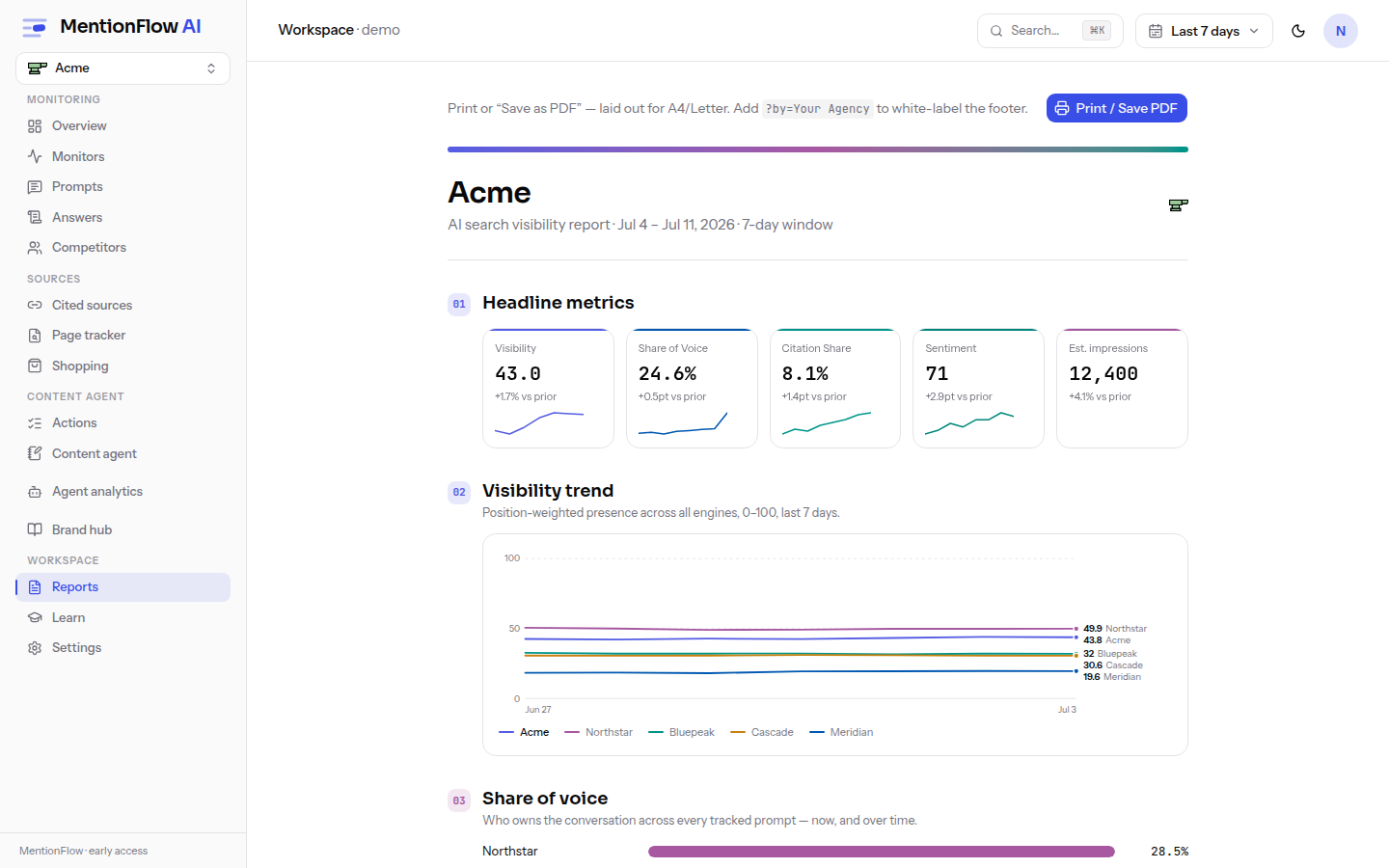
- The client report assembles the client's metrics into a print-ready document at A4 and Letter. Charts are drawn as server-side SVG so they print crisply, then you use Save as PDF from your browser's print dialog. Opening it has no plan gate. On Agency plans it is white-labeled: the footer reads "Prepared by <your agency>", defaulting to your workspace name, with a per-project override in the Report branding card. On those plans
?by=<Agency>in the URL still works as a one-off override. - Scheduled reports wrap that same report in a recurring email. Each brand gets one schedule. Pick weekly (fires with the first collection of the week, over the last 7 days) or monthly (fires on the 1st, over a rolling 28 days), add up to 10 recipients, and set it active. On Agency plans the email carries your agency name in the header, the footer, and the sender display name. The sending address stays MentionFlow's verified domain. Only workspace owners and admins can change a schedule or the branding.
Report delivery is honest about what happened. Every scheduled run generates the report. A run is marked Generated (built, email held), Delivered (the provider accepted it), or Failed. Never a fake "sent". Email only leaves once the workspace's sending domain is verified with the email provider. Until then the run still generates, and the link shows up on the Reports page and posts to a configured Slack webhook. Enabling a schedule also needs a verified email for accounts created on or after 2026-07-11. See Password and email verification.
Want a live data source instead of a document? The Looker Studio connector pulls visibility, share of voice, prompts, competitors, sources, and answers into a dashboard you can co-brand.
Give clients a login without giving up control
MentionFlow has four roles. The one built for agencies is client viewer:
| Role | Can do |
|---|---|
| Owner | Everything, including billing and granting or revoking ownership. |
| Admin | Manage members, keys, and billing; cannot touch the owner role. |
| Member | Full read and write on the workspace's data. |
| Client viewer | Read-only. Shares a live dashboard with no edit rights. |
A client-viewer seat hands a client a live view of their own reports without letting anyone change anything. Write access is derived from role on the server. A client viewer who reaches an edit action is stopped everywhere, not just in a hidden button.
To keep a client's people inside their own brand, scope their access. An invite, or an existing member or client viewer, can be restricted to chosen brands. Scoping is a member-and-client-viewer boundary only. Owners and admins always have workspace-wide access. MentionFlow refuses to create a "scoped admin", because the access gates run on role. Full detail is in Workspace and members.
Every invite is a single-use link that expires after seven days and can never grant ownership. Opening it shows a confirmation screen ("Join workspace as role?") and nothing happens until they confirm. Seat caps are re-checked at both invite creation and acceptance, so a burst of invites cannot over-fill your plan.
An audit trail of who did what
The workspace keeps an audit log of access-relevant changes: member role and project-scope changes and removals, invites created, emailed, accepted, and revoked, API keys created and revoked, scheduled-report changes, password and email-verification events, billing changes, Google Search Console connect and disconnect, data exports, brand archive, restore, and delete, and workspace deletion.
The log is fire-safe. A failure to record never blocks the change. One deliberate exception: an invite acceptance that grants a membership is recorded atomically with the grant, so a new member can never join unaudited.
The audit log also records support-view sessions. "View-as" is a MentionFlow operator capability. A member of our staff opens a customer workspace read-only under a signed, time-limited grant to help with a support request. It is not an agency feature for impersonating a client. An operator in support view holds no membership in the workspace they are viewing. Member, invite, role, and billing controls are read-only for them, and the session is logged.
What this adds up to
One workspace, one bill, one pooled quota. A rollup that tells you which client to open first. A per-client loop that ends in a scored to-do list. Reports that go out under your brand on a schedule. The honest reporting is the part a client learns to trust: Generated rather than a fake Sent, an em-dash rather than a zero, a receipt behind every number. It never inflates a quiet week into a good one.
Related
- Portfolio: the cross-client rollup you open on.
- Reports: the white-label report and scheduled delivery.
- Workspace and members: roles, client-viewer seats, scoping, and the audit log.
- Plans and quotas: brand, prompt, and seat caps per plan.
- Batch actions and search: manage hundreds of prompts across clients at scale.
- Looker Studio: a live, co-brandable data source.