Shopping demand
The searches assistants run while building product carousels, ranked Top, Trending, Losing, and New so you can see which shopping demand is rising or fading.
Shopping demand shows the searches an AI assistant runs while it builds a product carousel on your prompts. It ranks them, so you can see which shopping topics are rising, fading, or brand new. It is a focused view of your fan-outs, narrowed to answers that produced a shelf.
What it does
When ChatGPT answers a shopping question, it usually runs its own web searches first, then shows a carousel. MentionFlow captures those searches as fan-outs. Shopping demand keeps only the ones from answers where a carousel appeared, then compares the current window against the window just before it.
Every query here is a real search the assistant ran, lifted word for word from the stored answer. Never simulated.
Who it's for
- Merchandisers and category managers watching which product topics AI shoppers ask about right now.
- SEO and content teams who want early signal on rising shopping demand.
- Anyone auditing a shelf who wants to know whether interest in a topic is climbing or fading.
Try it
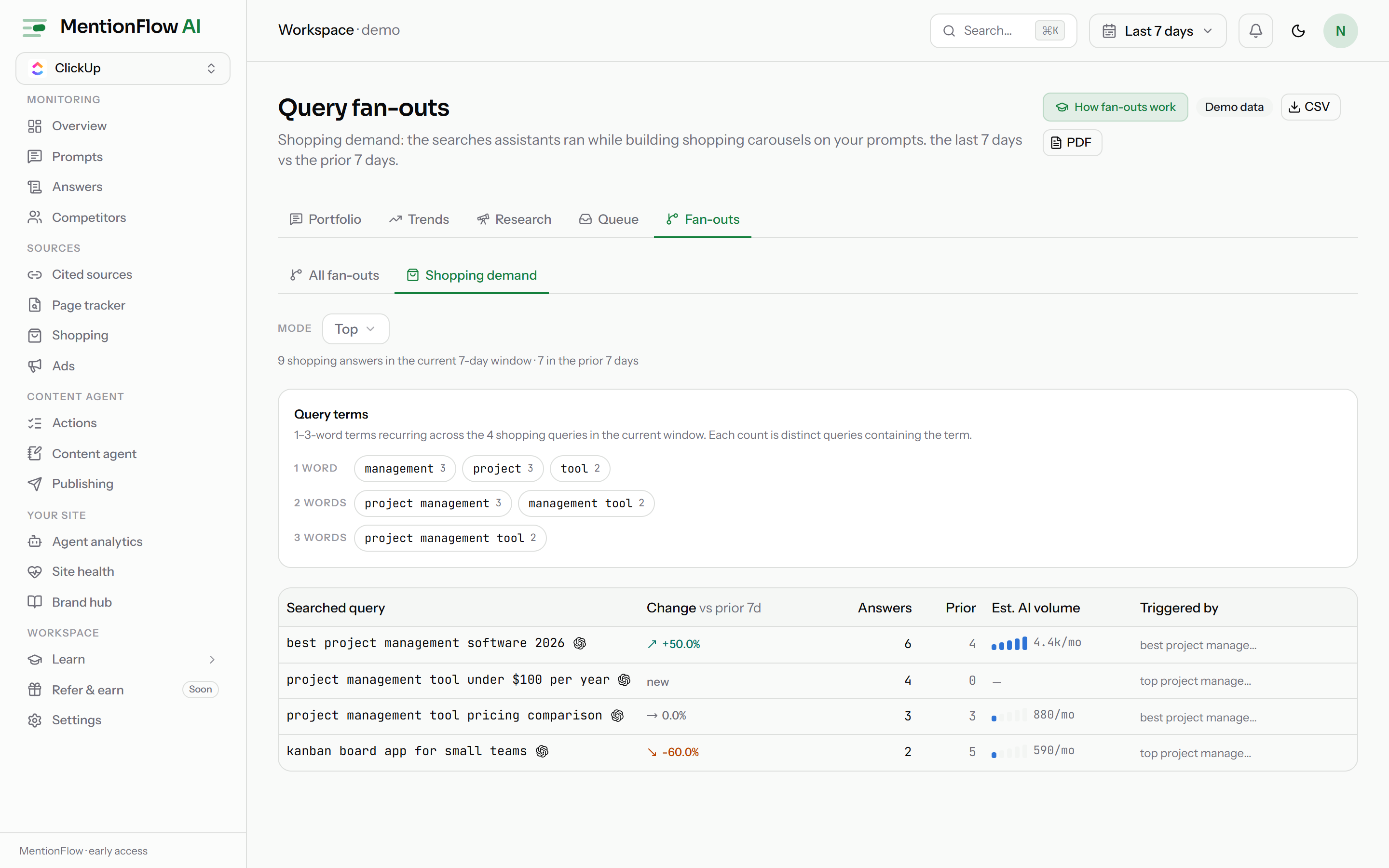
- Open Shopping and find the Shopping demand card. Or go to Fan-outs and switch the View selector from All fan-outs to Shopping demand.
- The header reads Query fan-outs, with a line describing the window. For example: "the searches assistants ran while building shopping carousels on your prompts, last 7 days vs the prior 7 days."
- Set the window with the date-range control at the top of the app. The view compares it against the equal-length window before it.
- Use the Mode selector to switch between Top, Trending, Losing, and New. The table re-ranks the same queries under each mode.
- Read a row: the Searched query, its Change vs prior window, how many Answers ran it now and in the Prior window, an Est. AI volume, and the Triggered by prompts that caused the search.
- Click Track on a promising row to turn it into a tracked prompt. A query already in your portfolio shows a tracked marker instead.
- Click CSV in the header to export the current mode exactly as shown.
The four modes
Each mode is the same set of queries, filtered and sorted a different way:
- Top: highest answer count in the current window. The only mode that works on day one, because it needs no earlier window.
- Trending: growing the most versus the prior window. A brand-new query appears under New, not here.
- Losing: declining the most. A query that ran before but has now vanished counts as the strongest decline.
- New: ran in the current window, absent from the prior one.
Trending, Losing, and New need a prior window. Until one exists, those modes say so plainly rather than guessing.
How it's computed
- Scope. Only fan-outs from answers that produced a carousel count. Each search is joined to a captured placement. It is not split by product, category, or merchant. It ranks queries, not products. You choose only the date window and the mode.
- The window. The current window is your selected range: 7, 14, 28, 90, or 180 days, or a custom span up to 200 days. It is compared against the prior equal-length window. The default is 7 days.
- Change (delta). A query's change is the movement in its answer count versus the prior window. With no prior window, or no runs before, the change reads new. Never a fabricated "+100%".
- Honesty rules. A missing estimated volume is an em-dash, meaning "no data", not zero. If no prior window has been observed yet, the Change column is an em-dash and the note reads "no prior 7-day window observed yet: change and the Trending / Losing / New modes unlock once one exists" (the day count follows your window). With only one day of shopping answers so far, the view warns that "one day is a snapshot, not a trend." These follow the data-honesty rule.
- Empty states are specific. With no shopping fan-outs at all, the view explains that these searches "appear once a shopping-intent prompt triggers a carousel." Each mode has its own "nothing to rank yet" copy when it filters to zero rows.
- Export. The CSV button downloads the current mode from
/api/export/shopping-demand. Empty prior and delta cells stay empty, meaning unknown, never zero.
Limits
- Effectively ChatGPT-sourced today. A query needs an engine payload that exposes the searches it ran (ChatGPT and Perplexity, see Fan-outs) plus a captured carousel on the same answer. Placements now come from four engines (see Engine coverage), but ChatGPT is the only one delivering both halves. Perplexity's carousels await vendor data, and the Google and Copilot channels do not expose their searches.
- Live workspaces only. The demo workspace shows labelled sample data.
- Estimated volumes require DataForSEO credentials. Without them, each volume is an em-dash rather than a guess.
Related
- Fan-outs: the full list of searches assistants ran, across all prompts.
- Engine coverage: which engines deliver shopping data today.
- Shopping analytics: who wins the shelf and how your presence moves.
- Shopping overview: how carousels are captured and matched to your catalog.
- Prompts: where a tracked query becomes a monitored question.
- Data honesty: the em-dash and single-day-snapshot rules.