Reports
The reports hub. The briefing that writes this window out in sentences, a print-ready client report (white-label on Agency plans), per-brand scheduled report emails, and the Looker Studio connector.
Reports gives you readable documents to show a client or your boss, instead of a screenshot dump. It can also email one out on a schedule. Three surfaces are live. The briefing at /reports/briefing states this window in plain sentences built from your measured values. The client report at /reports/client is what you generate and save as a PDF. Scheduled reports build the client report on a cadence and email it to recipients. On Agency plans, the client-facing output carries your agency's name instead of MentionFlow's.
What it does
The briefing reads your window back to you as an argument: what happened, the numbers under it, then the things the data could not support. The client report assembles your metrics into a print-ready document, exported as a PDF from your browser. A schedule wraps that report in a recurring email. Pick weekly or monthly, add recipients, and each period MentionFlow builds the report and emails a digest-style summary linking it.
The briefing
The briefing at /reports/briefing is your Overview window turned inside out. The headline is a sentence. The numerals are the evidence under it. It reads top to bottom as one column, with facts grouped by story rather than by metric.
Two doors open it: the "Generate report" button on the Overview, and the Briefing card on Reports.
It has four parts, in order:
- The lead: composed sentences saying where you stand and whether that moved, with your Visibility score on a banded meter beneath them.
- "The figures behind it": the same five headline values the Overview shows, in small print, each with its delta and its own explainer. This is the evidence, not the headline.
- The stories: up to five sections. Each is a claim with its supporting sentences, one illustrating figure, and a link to the surface that owns the detail where one exists. They are Where you stand, The prompts that moved most, How answers talk about you, Whether answers cite your site, and Which engines answer for you. A withheld claim renders no section at all.
- "What this briefing does not say": the claims the page would have made if the numbers supported them, each beside the measured reason it was dropped.
How the sentences are composed
Every claim is composed by a pure function from your measured values. No model writes any of this copy. There is no generation step, no network call, and no template filled with a guess. Every sentence is reproducible from the numbers beside it. Four rules govern what it may say:
- A hedge always names its own threshold. "Roughly flat" can't be checked, so the page says the checkable version instead. A visibility move under 5% is stated as being within 5% of the previous window. A sentiment move under 3 points and a share-of-voice move under 1 point are held to the same standard. A prompt only counts as having moved at 20%.
- Nothing is ever attributed to a cause. MentionFlow measures outcomes, not mechanisms, and nothing in a window says why a score moved. So the vocabulary has no "because", no "due to", no "drove". Two facts from the same window are joined by "at the same time" or by a semicolon, nothing stronger.
- Share of voice is never called a market share. Every sentence about it names the tracked set it divides by, and says that brands outside that set are not counted.
- When the data thins, the page says less rather than something vaguer. Each claim has a precondition. A claim whose precondition fails is dropped, not softened, and it reappears in the ledger with the measured reason. A brand that has never collected gets one honest sentence and one ledger entry for the whole page, not five near-identical apologies.
What the ledger catches
The ledger is the part that makes the rest worth trusting. Typical entries and their reasons:
| The claim it withheld | Because |
|---|---|
| Where your visibility stands | no answers were collected inside the selected window |
| How the engines compare | fewer than two engines collected at least five answers this window |
| How many AI answers you appear in each month | needs prompt volumes (or: unlocks when you appear on prompts with volume data) |
Estimated impressions never earns a sentence at all. It is a modeled monthly count with no denominator, no baseline and no verdict scale, and a narrative page is exactly where that would get laundered into a claim. It stays in the figures strip with its modeling stated. Only its absence, which does have a measured reason, is ever spoken about.
The em-dashes here borrow the ledger's reason rather than the metric's definition, so a missing figure explains why it is missing.
Scope and limits
- The briefing follows the top-bar date picker and the compare-to-previous toggle, exactly like the dashboard.
- It carries no engine, category, or monitor filters of its own, and it does not inherit the Overview's. A page with no control to reveal a filter must not apply one, so its numbers are the unfiltered, blended read of the same window.
- It computes no metric. Every value comes from the same data provider the Overview reads, so the two can never disagree.
- It is a screen document, not the print-ready PDF. That is the client report below. It carries no white-label footer identity.
The client report
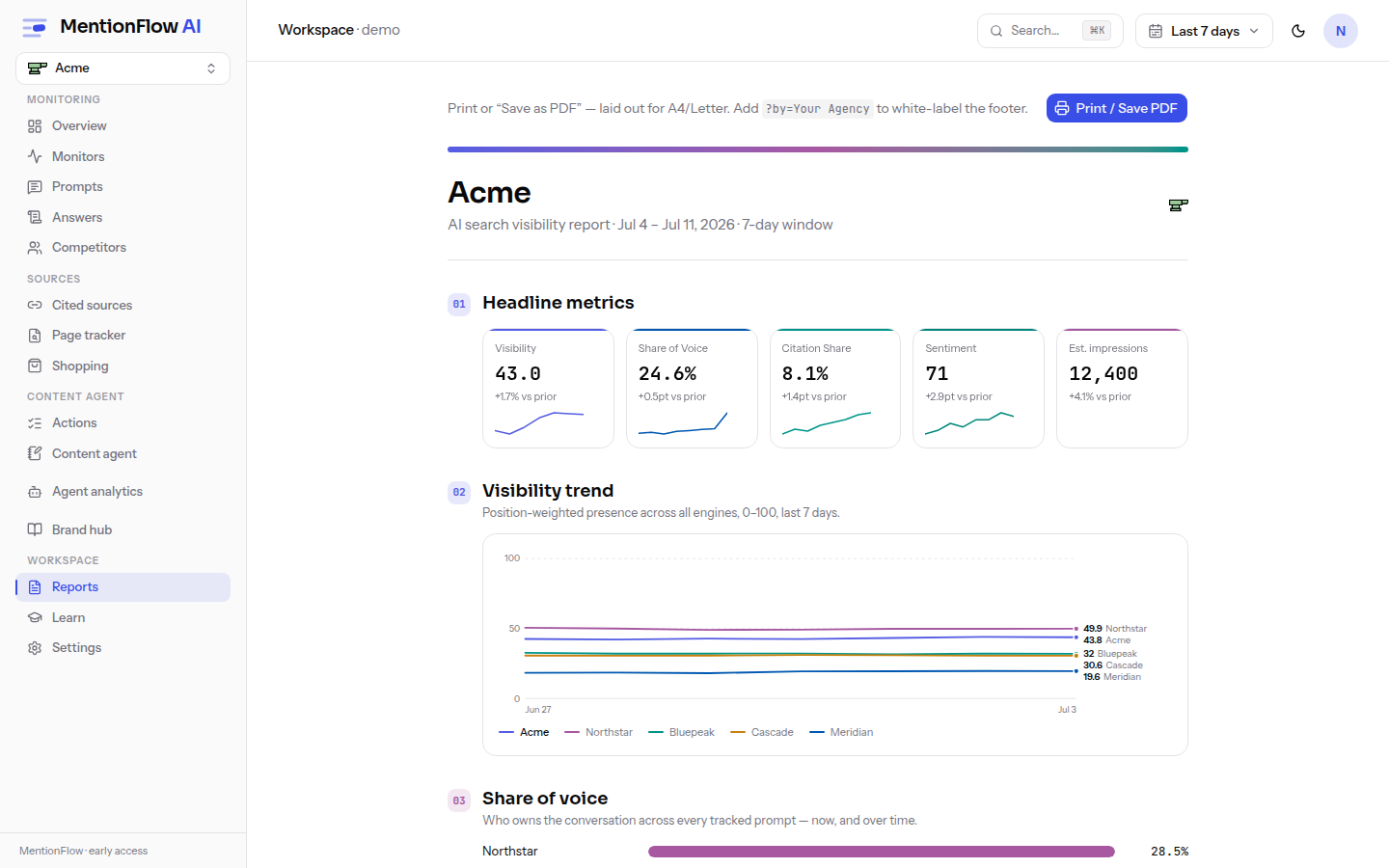
From Reports, open the client report:
- It is print-ready at A4 and Letter. It renders its charts as server-side SVG, so they print crisply.
- Save as PDF through your browser's print dialog.
The report fetches eleven data providers in parallel over your selected range, plus the workspace's report-branding and action-board reads. Sections 01 to 08 are fixed: headline metrics, visibility trend, share of voice, competitive standing, engines, prompt performance, the sources mix (with the community threads the engines cite), and content coverage (with the owned pages the answers cite).
After those, conditional sections render only when their data, and where noted your plan, supports them. They renumber in render order, so the document never skips or repeats a number. A "How to read this report" appendix always closes it. Every em-dash and null-vs-zero rule from the rest of the app applies. Deltas print "new" when the prior value is null. The shopping trend needs at least two collected days before it draws a line. No section prints a zero it didn't measure. See data honesty.
Opening the report has no plan gate. Every plan can generate and print it. The footer identity is plan-gated, and that is the next section.
Engines and metric scope
The report renders the engines that actually collected in the selected window, meaning your workspace's active engine set. Weekly-cadence engines (Claude and Grok) appear only in weeks they ran, labeled "weekly". Blended metrics (Visibility trend, Share of voice, Competitive standing) cover search-grounded engines only, exactly like the dashboard headline. Model-knowledge engines (DeepSeek, Mistral) are listed separately in the Engines section and left out of the blend, and the footer names both groups. The report and the dashboard read the same data provider over the same range, so their numbers can never disagree.
The masthead
The report header shows your brand's own saved logo when one is set under Brand identity, the same mark the logo editor stores. With no logo saved it falls back to the site's favicon, then a letter tile. This is the monitored brand's logo, and it appears on every plan. It is a different thing from the agency white-label footer identity below, which is name-only.
Conditional sections
After the eight fixed sections, these render only when the data is there, and where marked your plan too. They renumber in the order they appear:
| Section | Renders when | Plan |
|---|---|---|
| AI shopping carousels | the engines captured at least one product carousel this window | any |
| Sponsored placements in AI answers | the window holds answers that state ad presence | any |
| Site readiness for AI | a crawl of your site has run or discovered pages | Growth+ (siteHealth) |
| AI agent activity | crawler analytics is connected and reporting | Growth+ (agentAnalytics) |
| Recommended next steps | there are new recommendations, or a working board exists | any (board strip: live brands only) |
The two Growth+ sections mirror the dashboard's own plan gates exactly, so a section your plan doesn't include never leaks to an outside reader. In the demo workspace they stay open, just like the dashboard. An unknown workspace fails closed.
How the new sections stay honest
- Sponsored placements count only answers capable of reporting ads, the ones where an engine states ad presence. Today that is ChatGPT. Other engines are unknown, never assumed ad-free. The "answers with ads" rate and its "X of N" share that stated-presence numerator, so the tile can't contradict itself. A known denominator with no ad answers is a true zero, said plainly, not an em-dash. Advertiser identity is engine-stated, and an unnamed advertiser reads "(not stated)". Structured ad capture began July 2026, so earlier periods can't appear, and the section is absent when no answer could report ads at all. See Ads.
- Site readiness reports the latest crawl's state, labeled as such. It is not windowed to the report period. Speed figures carry their exact N-of-M sampled coverage ("sampled 3 of 8 crawlable pages") plus the sample date. A
robots.txtorllms.txtthat couldn't be reached reads "couldn't check", never "Missing". See Site health. - Community threads measures your presence over the threads the engines actually cite and MentionFlow has checked. Related-nearby discoveries are left out. An unchecked thread stays unknown, never "not in thread". See Sources.
- Owned pages ("Pages doing the work") lists your own URLs the answers cite, verbatim from the coverage tab's attribution. See Content.
- The working-board strip shows the board's current state (suggested / in progress / done), deliberately not windowed. A card's timestamp also moves on routine snapshot refreshes, so "done this period" can't be derived honestly. The one windowed number is recommendations verified closed this period, dated by a real one-time
resolvedAtevent. The strip appears for live brands only. See Actions.
White-label branding (Agency plans)
On Agency plans (Agency Starter, Agency Growth, Agency Advanced), client-facing report output carries your name instead of MentionFlow's:
- The client report footer reads "Prepared by <your name>".
- Scheduled report emails carry the same identity in the header, the footer, and the sender display name. The sending address stays MentionFlow's verified domain, because that is what your clients' spam filters trust.
The name defaults to your workspace name. The Report branding card on Reports stores a per-project override ("Prepared by"), so different client projects can ship under different letterheads. ?by=<Agency> in the report URL still works as a one-off override for entitled plans only.
On every other plan, the footer reads "Prepared by MentionFlow" and report emails stay unbranded. The ?by= parameter is ignored, enforced server-side rather than just hidden in the UI. Changing branding is owner/admin only, read-only in support view, and audit-logged (Report branding changed).
Agency white-label branding is name-only. There is no agency-logo letterhead upload for the footer or email identity yet. The report masthead is a separate thing, and it does show the monitored brand's own saved logo.
Scheduled reports
A per-brand schedule lives on the Reports page. Each brand has one schedule. Saving overwrites it.
| Setting | Options |
|---|---|
| Report | The client report (no other report type). |
| Cadence | Weekly fires with the first collection cycle of each week (Mondays), over the last 7 days. Monthly fires with the first collection cycle of each month (the 1st), over the last 28 days. |
| Recipients | Up to 10 email addresses, comma-separated. |
| Status | Active or Paused. Paused schedules generate no runs. |
Schedules are opt-in. Nothing is sent until you create one and set it Active. The window is labeled "last 7 days" or "last 28 days". Monthly is a rolling 28-day window, never a fake calendar month.
Who can manage schedules
Only workspace owners and admins can create or change a schedule, the same fence as member and billing management. Client viewers and operators in support view see it read-only.
Enabling a schedule needs a verified email address for accounts created on or after 2026-07-11. An active schedule emails workspace data to outside recipients, so it is one of the egress-gated actions. Pausing or saving a disabled draft is never gated.
Delivery depends on a verified sending domain
Email delivery turns on only once the workspace's sending domain is verified with the email provider, and a real app URL is set. Until then, every scheduled run still builds the report. The link is shown on the Reports page, and posted to the brand's Slack webhook if one is configured on Notifications. Those runs are marked "generated", never a fake "sent".
Each run carries an honest status:
| Status | Meaning |
|---|---|
| Generated | The report was built; email was deliberately held (domain not yet verified). |
| Delivered | The email provider accepted the message. |
| Failed | The send was attempted and failed. |
Delivery is attempted once per period. A failed run is not retried until the next week or month begins. The Recent runs panel shows the last several runs with their period and window length.
The rest of the hub
- Looker Studio connector: pull visibility, share of voice, prompts, competitors, sources, and answers into Looker Studio via an Apps Script deploy. See Looker Studio. A native, scheduled Looker sync inside MentionFlow is previewed but not yet shipped.
- Daily email digest: a per-cycle digest of what changed. It is previewed, and it begins delivering once outbound email is configured for the workspace.
Limits
- One schedule per brand, and up to 10 recipients.
- Cadence is weekly or monthly only.
- Any schedule change is owner/admin only. Enabling one also needs a verified email on post-2026-07-11 accounts. Saving a paused draft doesn't.
- Report emails send only from a verified sending domain. Until then runs generate but hold delivery.
- The briefing has no plan gate, no white-label identity, and no filters of its own. It follows only the date picker.
- Opening the manual client report has no plan gate. White-label footer branding is Agency-plan only, name-only, with no agency letterhead-logo upload yet. The report masthead shows the monitored brand's saved logo on any plan.
- The Site readiness and AI agent activity sections are Growth+ for live workspaces. Every other new section is data-gated only. The Looker native sync and daily digest are not yet shipped.
Related
- Dashboard overview: the surface the briefing is composed from, and the home of its "Generate report" button.
- Data honesty: the null-vs-zero and em-dash rules every surface here applies.
- Password and email verification: the verification gate on enabling a schedule.
- Portfolio: the agency multi-client rollup.
- Shopping analytics: source of the report's shopping section.
- Ads: source of the sponsored-placements section.
- Site health: source of the site-readiness section.
- Crawlers: source of the AI agent activity section.
- Looker Studio: the connector and the previewed native sync.