For in-house marketing teams
Own your brand's AI answer share the way you own its search share — track the questions that matter, watch competitors take or lose ground, work a scored action board, and ground demand in your own Search Console data.
Your customers increasingly ask an AI assistant before they ask a search box. When someone types "best [your category] for [their use case]" into ChatGPT or gets a Google AI Overview, either your brand is in the answer or a competitor is. An in-house team already owns the org's search visibility; MentionFlow gives you the same ownership over its AI answer visibility — the questions you win, the rivals taking ground, and a prioritized list of what to fix — measured from the answers engines actually give, not a model's guess about them.
This guide is the in-house playbook: what to set up, what to read each week, and how to turn a gap into a shipped fix.
Set up what you want to be found for
Start by deciding the questions that matter. Your project's collection config (under Settings → Project Settings → Collection) is the sampling setup — up to five markets, one collection language, an optional persona, and the engines the project collects with (projects inherit the workspace default from Settings → Workspace → Engines until customized) — and the prompts it collects run on your plan's cadence (daily on every paid plan). Every prompt is asked once per market, so each market you add spends more of your daily checks. The language is picked once, at project creation, and is either a single language for the whole project or Auto, which asks each market in its own default language. The prompt portfolio is where the questions live, and it is built to be organized like a real content operation:
- Topics, tags, and funnel stages group prompts so you can read visibility by campaign, by product line, or by top-/mid-/bottom-of-funnel.
- Category prompts — questions that don't name you or a named rival — are the honest test of whether you get recommended when nobody put your name in the question. The Overview has a "Category prompts only" toggle for exactly this view.
- As the list grows, batch actions and search let you retag, re-topic, or relocate hundreds of prompts at once.
Don't guess the whole list. Research turns real search-demand data plus a language model into candidate prompts (at least 80% unbranded), and Fan-outs surface the actual web searches assistants ran while answering you — each one trackable in a click. Both feed the suggestion queue, so your coverage grows from observed demand rather than a brainstorm.
Read the scorecard
The Overview is your weekly standup screen — one rolling window as five headline metric cards plus a content-coverage tile:
- Visibility (0–100) — how prominently answers name you, weighted by position. It is the first card, and the number the rest of the page decomposes; the score is coloured against a published Low / Building / Strong cutoff, with the band word spelled out beneath it.
- Share of Voice — your slice of the answer versus your competitor set, as a zero-sum split. Read it as a within-set share: brands the answers name that you don't track are not in the denominator, and the card says so on its face.
- Citation Share, Sentiment, and Estimated impressions round out the headline.
Every headline number blends only the search-grounded engines — the ones that run live web searches — so the figure keeps one consistent meaning; the knowledge-only engines (DeepSeek, Mistral) are segmented out, never silently averaged in. The same scope feeds the API, so a dashboard and an export never disagree. A metric built from fewer than five runs is badged low-confidence, and a gap in collection draws a null day, never a fabricated dip — judge trends, not ticks.
One signal worth building a habit around: on the "You vs. competitors" trend, switch to the Visibility view and watch the dashed "your site cited" line against the solid name line. When the dashed line runs above the solid one, AI assistants are reading your site but not saying your name — a direct brief for your content and PR teams.
Watch the competitive set
Competitors answers the question a CMO actually asks: who is winning the answer, and where am I losing it?
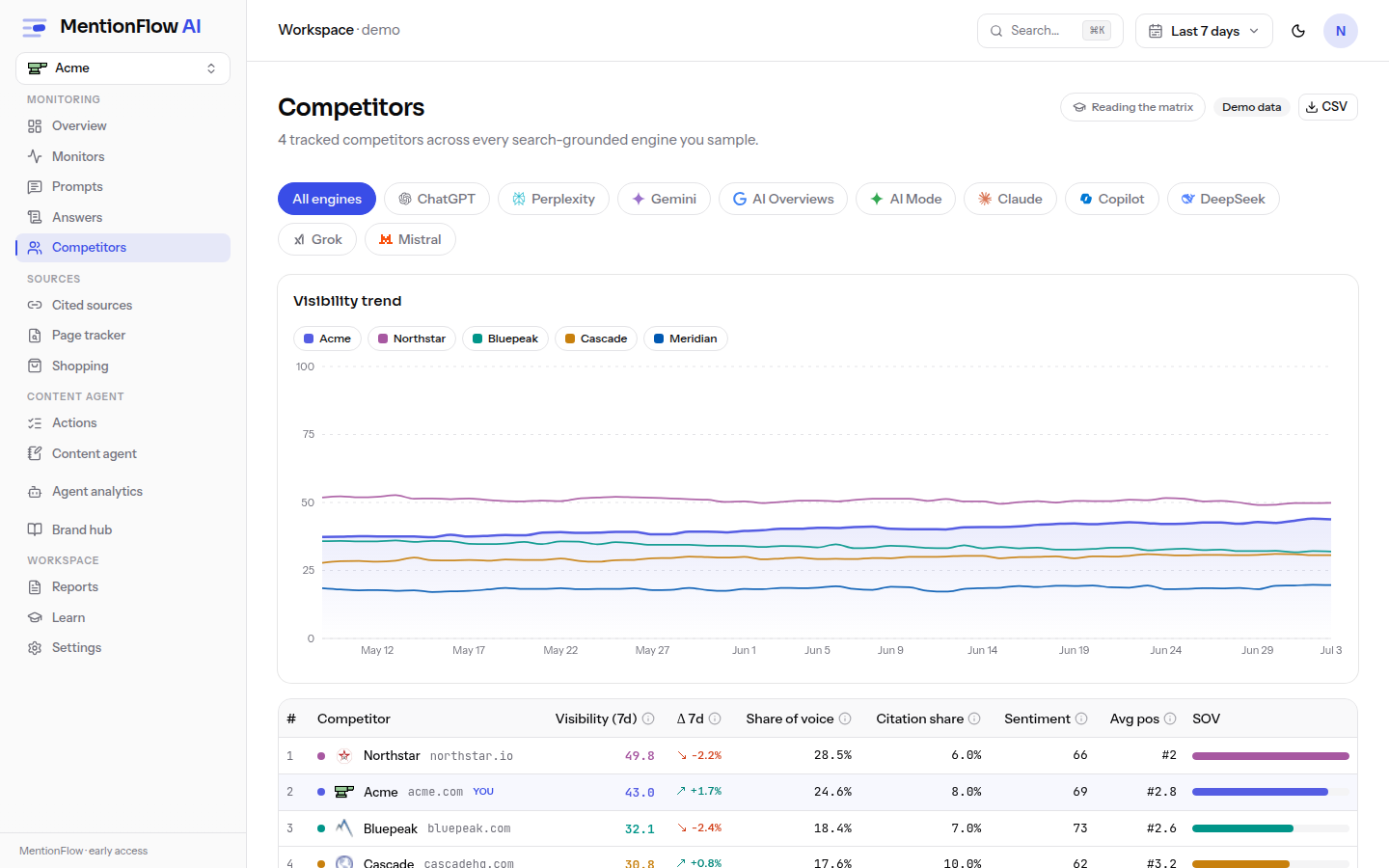
- The leaderboard ranks you and your rivals by Share of Voice; a trend and an engine heatmap show how that split moves over time and by engine.
- The answer-gap matrix flags prompts where a rival clearly beats you — a gap fires when a prompt has at least three runs, your presence is below 0.2, and some rival's is at least 0.6 — and links each gap to an action or a content brief, so it becomes a task, not a chart.
- Discovery surfaces rivals you never entered but that keep appearing in answers, so your set stays current.
If engines call a competitor by a nickname, product name, or misspelling, teach MentionFlow with Matching rules so those mentions are counted correctly — and re-scan history to apply the rule to answers you already collected.
Work the fixes
Actions turns the deterministic recommendation engine into a persistent kanban board. Fourteen pure rules score each recommendation — priority = round(100 × impact × confidence), with confidence saturating at five runs so a thin sample can't out-rank a solid one — and cards move through Suggested → Planned → In progress → Done. The board auto-closes a card, marking it "verified by data", when the engine stops emitting it, and un-resolves one if the gap comes back. Each card offers Evidence, Source, and a one-click content brief grounded in your real answers and knowledge base. Actions is available on every plan.
Ground demand in your own search data
Connect Google Search Console and two things sharpen from modeled estimates into measured facts:
- Measured demand tiers. When a query behind a prompt appears in your own Search Console data, its volume is labelled measured rather than modeled — MentionFlow never sums your GSC impressions into a volume band, it labels which is which (see the demand confidence tiers).
- Striking distance. Research surfaces the queries you already rank 8–20 for with real impressions — the near-misses where a small push could break you into the answer engines' source set.
A connection is read-only, gated to an owner or admin, and a property is rejected unless it covers your brand's domain, so the join can only ever use pages you actually own. Disconnecting demotes any "measured" evidence back to an honest em-dash.
Some capabilities follow your plan. Agent (crawler) analytics — seeing which AI crawlers fetch your site and whether those pages earn citations — is a Growth-plan feature (Crawlers). Engine slots and collection cadence are also plan-controlled; see Plans and quotas.
A weekly rhythm
- Open the Overview, toggle Category prompts only, and read the five headline cards against last period.
- Check Competitors for any rival that moved, and send fresh gaps to the board. Once a month, open the Discovered tab and work the names your answers keep saying that nobody put on the tracked set.
- Work the top of the Actions board; spin a brief for the highest-priority content gap.
- Skim Sources for a new domain or community thread shaping your answers — an "opportunity" flag is a placement to chase.
- When a number surprises you, open the receipt behind it and read exactly what the engine said.
Related
- Dashboard overview — the weekly scorecard.
- Competitors — the Share-of-Voice leaderboard and gap matrix.
- Actions — the scored, self-closing action board.
- Google Search Console — measured demand and striking distance.
- Metrics overview — every headline number, defined.
- Content — where a gap becomes a drafted, tracked article.